Showing posts with label constants. Show all posts

Wednesday, 13 February 2019

Prolog: Constants


Constants are used to name specific objects (or) relationships.

There are two kinds of constants in Prolog.
a.   Symbolic constants
b.   Numbers

Symbolic constants
Symbolic constants starts with lowercase alphabets.

For example, all the names that we are used in facts are constants.

male(krishna).
male(rama).
male(hari).

In the above facts, Krishna, rama and hari are contants.

Apart from these special symbols ?- (Used to ask question), :-(Used to define a rule) are also constants in Prolog.

Numbers
A constant can be numeric like 1, 3.14, 143, 3e4 etc.,


Previous                                                 Next                                                 Home

Sunday, 9 December 2018

How to define constants and what is the behaviour in of constant object?

How to define a constant?
You can create a constant using ‘const’ keyword.

Syntax
const variableName1 = value1 [, variableName2 = value2 [, ... [, variableNameN = valueN]]];

HelloWorld.js
const PI = 3.14;

console.log("Value of PI is : " + PI);

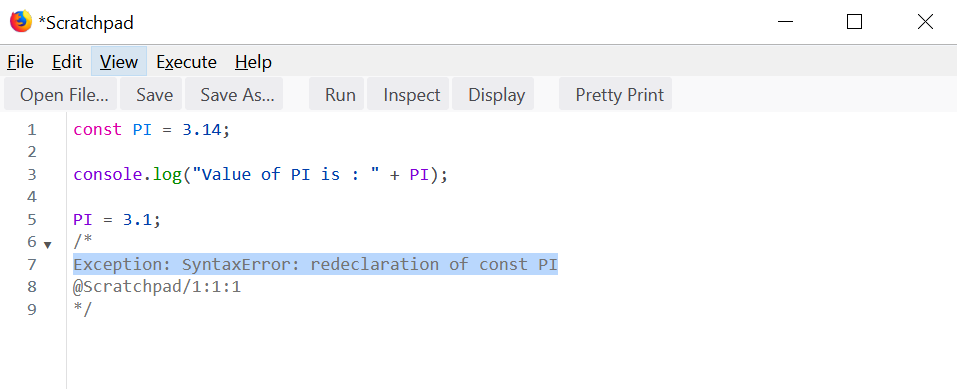
You can’t redefine a constant variable.

HelloWorld.js
const PI = 3.14;

console.log("Value of PI is : " + PI);

PI = 3.1;

When you try to run above application, you will end up in below exception.

SyntaxError: redeclaration of const PI


Naming Convention of constants
a.   A constant variable starts with a letter, underscore or dollar sign ($) and can contain alphabetic, numeric, or underscore characters
b.   Constant variable is in upper case letters.
Scope rules of constants
Constants are block-scope variables. Constant variable declared within a block is visible in that block only.

HelloWorld.js
{
  const PI = 3.1428
  console.log("Value of PI is " + PI);
  {
    const PI = 3.142
    console.log("Value of PI is " + PI);
    {
      const PI = 3.14
      console.log("Value of PI is " + PI);
    }
    console.log("Value of PI is " + PI);
  }
  console.log("Value of PI is " + PI);
}

When you ran above application, you can see below messages in console.

Value of PI is 3.1428
Value of PI is 3.142
Value of PI is 3.14
Value of PI is 3.142
Value of PI is 3.1428

Behaviour of constant object
When you define a constant variable, it creates a read-only reference to a value. It means the variable identifier can't be reassigned, but the value it holds can be changed.

HelloWorld.js
function print_admin_details(){
  console.log("name : " + ADMIN_EMPLOYEE.name);
  console.log("password : " + ADMIN_EMPLOYEE.password);
}

const ADMIN_EMPLOYEE = {'name': 'Krishna', 'password' : 'pwd123'};

print_admin_details();
console.log("Changing the admin name");

ADMIN_EMPLOYEE.name = 'Ram';
print_admin_details();


When you ran above application, you can see below messages in the console.

name : Krishna
password : pwd123
Changing the admin name
name : Ram
password : pwd123

As you see the output, name of the constant variable ADMIN_EMPLOYEE is changed to Ram.

Since arrays also objects in JavaScript, behavior is same for arrays also.

HelloWorld.js
const MY_HOBBIES = ["CHESS", "CRICKET", "FOOTBALL"];

MY_HOBBIES.push('COMPUTER PROGRAMMING');

console.log(MY_HOBBIES);


When you ran HelloWorld.js file, you can see below messages in console.

Array(4) [ "CHESS", "CRICKET", "FOOTBALL", "COMPUTER PROGRAMMING" ]


Previous                                                 Next                                                 Home

Friday, 21 February 2014

final variables

final is used to create two types of constants
    1. Creating final constants
    2. Creating final reference variables

1. Creating final constants.
Below post discussed about the final constants
http://selflearningjava.blogspot.in/2014/02/keyword-final.html

2. Creating final reference variables
When you assign an object to final reference variable, then the reference variable points to the same object, the object can change its state, I.e, its values. Assigning some other object or reference to the final reference variable is not allowed.

Example
class FinalReferenceEx{
  int width, height;

  public static void main(String args[]){
    final FinalReferenceEx ref1 = new FinalReferenceEx();

    ref1.width = 100;
    ref1.height = 200;
    System.out.println("Width is " + ref1.width + " height is " + ref1.height);

    ref1.width = 200;
    ref1.height = 300;
    System.out.println("Width is " + ref1.width + " height is " + ref1.height);
  }
}
   
Output
Width is 100 height is 200
Width is 200 height is 300

As you observe the output, the final reference variable is allowed to change the properties of the object that it is pointing. But it is not allowed to refer other object.

Example
class FinalReferenceEx{
  int width, height;

  public static void main(String args[]){
    final FinalReferenceEx ref1 = new FinalReferenceEx();

    ref1.width = 100;
    ref1.height = 200;
    System.out.println("Width is " + ref1.width + " height is " + ref1.height);

    ref1.width = 200;
    ref1.height = 300;
    System.out.println("Width is " + ref1.width + " height is " + ref1.height);

    ref1 = new FinalReferenceEx();
  }
}

I am trying to assign a new object to the final reference variable ref1, which is not acceptible, so compiler throws below error.

FinalReferenceEx.java:16: error: cannot assign a value to final variable ref1
ref1 = new FinalReferenceEx();
^
1 error

The same applicable for Arrays also, since Arrays also reference types.

Some Points to Remember

1. If a final variable holds a reference to an object, then the state of the object may be changed by operations on the object, but the variable will always refer to the same object.

2. What is blank final variable in Java ?
Blank final variable in Java is a final variable which is not initialized while declaration, instead they are initialized on constructor or initializer blocks or static initialization blocks.

Related Links

final keyword                                                 final classes and methods                                                 Home

final keyword

final key word is used to define

Java support the creation of constants using final keyword.

super keyword                                                 final variables                                                 Home

Sunday, 16 February 2014

Interfaces in Java

In JAVA, interfaces are reference types contain only constants, method signatures, nested types.

Interfaces doesn't contain method bodies, these are implemented by classes, extended by interfaces.

Defining an Interface
   interface InterfaceName{
      // constant declarations, if any
      // method signatures
      // Nested Types
   }

Note
All the methods in the interface are public.
All the variables in the interface are public static final.
Implementing An Interface
A class implements the interface provides the method body for the method signatures in the interface.

Syntax
    Class ClassName implements Interface1, Interface2, ...Interface N{
        //implements the interfaces
    }

Example
interface Circle{
  double PI = 3.1428;
  double getArea(int r);
}

 
class MyCircle implements Circle{
  public double getArea(int r){
    return (Circle.PI * r * r);
  }

  public static void main(String args[]){
    MyCircle circle1 = new MyCircle();
    System.out.println("Area of the circle is " +circle1.getArea(10));
  }
}


Output 
Area of the circle is 314.28
 
Some Points to Remember

1.If a class implements an interface, then it must implement all the methods in the interface, other wise, the class must declared as a abstract.
Example
interface Circle{
  double PI = 3.1428;
  double getArea(int r);
}

class MyCircle implements Circle{

}
   
When you tries to compile the class MyCircle, compiler throws the below error
MyCircle.java:1: error: MyCircle is not abstract and does not override abstract
method getArea(int) in Circle
class MyCircle implements Circle{
^
1 error

To make the program compile,there are two options
    1. Implement the methods signatures of the interface in the class.
   2. Make the class as abstract like below
        abstract class MyCircle implements Circle{

        }
  
2.By default all the methods in the interface are public, while implementing the interface, class must provide the public access specifier for the methods it implementing, otherwise “weaker access privileges” error thrown at compile time.

Example
interface Circle{ 
  double PI = 3.1428;
  double getArea(int r); 
}

class MyCircle implements Circle{
  double getArea(int r){
    return (Circle.PI * r * r);
  }
}

When you tries to compile the MyCircle class, compiler throws the below error.

MyCircle.java:2: error: getArea(int) in MyCircle cannot implement getArea(int) in Circle
double getArea(int r){
^
attempting to assign weaker access privileges; was public
1 error


3. All the variables in the interface are final by default, so updating the variable in a class causes the compile time error
Example
class MyCircle implements Circle{
  public double getArea(int r){ 
    Circle.PI=3.12; 
    return (Circle.PI * r * r);
  }
}

When you tries to compile the above program, compiler throws the below error
MyCircle.java:3: error: cannot assign a value to final variable PI
Circle.PI=3.12;
^
1 error


4. Can interface has static methods ?
Yes (From Java8 onwards)


Interfaces                                                 Interface as reference type                                                 Home

Sunday, 9 February 2014

keyword : final

final is used to define constants. The final modifier indicates that the value of this field cannot change.

Defining class level constants
Declare the field with final and static combination

Example
class Person{
 static final int MAX_SALARY = 10000000;
 public static void main(String args[]){ 
  System.out.println(Person.MAX_SALARY);        
 }
}
       
Output
10000000
   
Defining Object level constants
    Declare the field with final keyword.

   Example
class Person{
 final int MAX_SALARY;

 Person(){
  MAX_SALARY = 10000;
 }

 Person(int sal){
  MAX_SALARY = sal;
 }

 public static void main(String args[]){
  Person p1 = new Person(1000000);
  System.out.println(p1.MAX_SALARY);
 }
} 

Output
 1000000 
   
Some Points to Remember
1. You must initialize the static final variables, other wise compiler throws the error
Example
class Person{
 final static int MAX_SALARY;
 public static void main(String args[]){
  System.out.println(Person.MAX_SALARY);
 }
}
  

When you try to compile the above program, compiler throws below error
Person.java:1: error: variable MAX_SALARY might not have been initialized
class Person{
^
1 error

This is not the case with non final variables.
Example
class Person{
 static int MAX_SALARY;
 
 public static void main(String args[]){
  System.out.println(Person.MAX_SALARY);
 }
}

Output    
0
          
2.Static final variables must be initialized at the time of creation or in the static block, Otherwise compiler throws error
class Person{
 static final int MAX_SALARY;
 
 static{
  MAX_SALARY = 1000000;
 }
 
 public static void main(String args[]){
  System.out.println(Person.MAX_SALARY);
 }
}
  
Output
1000000
   

Above program compiles and runs fine, since initializing the static final variable in the static block is completely fine.

3. Trying to initialize the static final variable other than at the time of creation or in static block cause the compile time error. 
Example
class Person{
 static final int MAX_SALARY;
 
 Person(){
  MAX_SALARY = 1000000; //is a static final, can't be initialized here
 }
 
 public static void main(String args[]){
  System.out.println(Person.MAX_SALARY);
 }
}
        
 When you try to compile the above program, compiler throws the below error
Person.java:5: error: cannot assign a value to final variable MAX_SALARY
MAX_SALARY = 1000000;
^
1 error

4. You must initialize the final variables whether those are static or non-static, otherwise compiler throws error
class Person{
   final int MAX_SALARY;
   public static void main(String args[]){
   }
}


When you tries to compile the program, Compiler throws below error
Person.java:1: error: variable MAX_SALARY might not have been initialized
class Person{
^
1 error
                           
5. Final instance variables must be initialized in the constructor or in the instance blocks.
Example 1
class Person{
 final int MAX_SALARY;
 Person(){
  MAX_SALARY = 10000;
 }
}
     
Example 2  
class Person{
 final int MAX_SALARY;
 
 {
  MAX_SALARY = 100000;
 }

 Person(){

 }

 void setSalary(){

 }
}

6. Trying to initialize final instance variables, other than in constructor causes compile time error.  

class Person{
 final int MAX_SALARY;

 Person(){
 }

 void setSalary(){
  MAX_SALARY = 100000;
 }
}
  

Compiler throws the below error
Person.java:8: error: cannot assign a value to final variable MAX_SALARY
MAX_SALARY = 100000;
^
1 error
 
7. final for Reference types: For references to objects, final ensures that the reference will never change, meaning that it always refer to the same object. It makes no guarantees whatsoever about the values inside the object being referred to staying the same.

8. How to declare global constants in Java ?
Make a variable as public static final.


this keyword                                                 nested classes                                                 Home