Showing posts sorted by relevance for query test. Sort by date Show all posts

Sunday, 15 March 2020

TestNG: Working with ITestListener

ItestListener is a listener class for running test class. Below table summarizes the methods in ItestListener class.

Method
Description
void onTestStart(ITestResult result)
Invoked each time before a test will be invoked.
void onTestSuccess(ITestResult result)
Invoked each time a test succeeds.
void onTestFailure(ITestResult result)
Invoked each time a test fails.
void onTestSkipped(ITestResult result)
Invoked each time a test is skipped.
void onTestFailedButWithinSuccessPercentage(ITestResult result)
Invoked each time a method fails but has been annotated with successPercentage and this failure
still keeps it within the success percentage requested.
void onTestFailedWithTimeout(ITestResult result)
Invoked each time a test fails due to a timeout.
void onStart(ITestContext context)
Invoked before running all the test methods belonging to the classes inside the test tag and calling all their Configuration methods.
void onFinish(ITestContext context)
Invoked after all the test methods belonging to the classes inside the test tag have run
and all their Configuration methods have been called.
Find the below working application.

Step 1: Implement ItestListener interface.

CustomTestListener.java
package com.sample.app.tests;

import org.testng.ITestContext;
import org.testng.ITestListener;
import org.testng.ITestResult;

public class CustomTestListener implements ITestListener {
 public void onTestStart(ITestResult result) {
  System.out.println(result.getName() + " test case started");
 }

 public void onTestSuccess(ITestResult result) {
  System.out.println("The name of the testcase passed is :" + result.getName());
 }

 public void onTestFailure(ITestResult result) {
  System.out.println("The name of the testcase failed is :" + result.getName());
 }

 public void onTestSkipped(ITestResult result) {
  System.out.println("The name of the testcase skipped is :" + result.getName());
 }

 public void onTestFailedButWithinSuccessPercentage(ITestResult result) {
  System.out.println("The name of the testcase on test failed but within success percentage :" + result.getName());
 }

 public void onTestFailedWithTimeout(ITestResult result) {
  System.out.println("Test failed with time out :" + result.getName());
 }

 public void onStart(ITestContext context) {

 }

 public void onFinish(ITestContext context) {
  System.out.println("Test Finished : " + context.getName());
 }
}

Step 2: Specify the listener using @Listener annotation.
@Listeners(CustomTestListener.class)

CustomTestListenerDemo.java
package com.sample.app.tests;

import static org.testng.Assert.assertTrue;

import org.testng.SkipException;
import org.testng.annotations.AfterTest;
import org.testng.annotations.BeforeTest;
import org.testng.annotations.Listeners;
import org.testng.annotations.Test;

@Listeners(CustomTestListener.class)
public class CustomTestListenerDemo {
 @BeforeTest
 public void beforeTest() {
  System.out.println("Inside before test");
 }

 @AfterTest
 public void afterTest() {
  System.out.println("Inside after test");
 }

 @Test
 public void test1() {
  System.out.println("Inisde test 1");
 }

 @Test
 public void test2() {
  System.out.println("Inisde test 2");
 }

 @Test
 public void test3() {
  throw new SkipException("test3 is skipped");
 }

 int i = 0;

 @Test(successPercentage = 50, invocationCount = 5)
 public void test4() {
  i++;
  System.out.println("Inisde test 4, invocation count : " + i);

  if (i % 2 == 0) {
   assertTrue(false);
  }
 }

}

Run CustomTestListenerDemo.java, you will see below messages in console.
[RemoteTestNG] detected TestNG version 7.0.0
Inside before test
test1 test case started
Inisde test 1
The name of the testcase passed is :test1
test2 test case started
Inisde test 2
The name of the testcase passed is :test2
test3 test case started
The name of the testcase skipped is :test3
test4 test case started
Inisde test 4, invocation count : 1
The name of the testcase passed is :test4
test4 test case started
Inisde test 4, invocation count : 2
The name of the testcase on test failed but within success percentage :test4
test4 test case started
Inisde test 4, invocation count : 3
The name of the testcase passed is :test4
test4 test case started
Inisde test 4, invocation count : 4
The name of the testcase on test failed but within success percentage :test4
test4 test case started
Inisde test 4, invocation count : 5
The name of the testcase passed is :test4
Inside after test
Test Finished : Default test
PASSED: test1
PASSED: test2
PASSED: test4
PASSED: test4
PASSED: test4
SKIPPED: test3
org.testng.SkipException: test3 is skipped
 at com.sample.app.tests.CustomTestListenerDemo.test3(CustomTestListenerDemo.java:35)
 at sun.reflect.NativeMethodAccessorImpl.invoke0(Native Method)
 at sun.reflect.NativeMethodAccessorImpl.invoke(NativeMethodAccessorImpl.java:62)
 at sun.reflect.DelegatingMethodAccessorImpl.invoke(DelegatingMethodAccessorImpl.java:43)
 at java.lang.reflect.Method.invoke(Method.java:498)
 at org.testng.internal.MethodInvocationHelper.invokeMethod(MethodInvocationHelper.java:133)
 at org.testng.internal.TestInvoker.invokeMethod(TestInvoker.java:584)
 at org.testng.internal.TestInvoker.invokeTestMethod(TestInvoker.java:172)
 at org.testng.internal.MethodRunner.runInSequence(MethodRunner.java:46)
 at org.testng.internal.TestInvoker$MethodInvocationAgent.invoke(TestInvoker.java:804)
 at org.testng.internal.TestInvoker.invokeTestMethods(TestInvoker.java:145)
 at org.testng.internal.TestMethodWorker.invokeTestMethods(TestMethodWorker.java:146)
 at org.testng.internal.TestMethodWorker.run(TestMethodWorker.java:128)
 at java.util.ArrayList.forEach(ArrayList.java:1257)
 at org.testng.TestRunner.privateRun(TestRunner.java:770)
 at org.testng.TestRunner.run(TestRunner.java:591)
 at org.testng.SuiteRunner.runTest(SuiteRunner.java:402)
 at org.testng.SuiteRunner.runSequentially(SuiteRunner.java:396)
 at org.testng.SuiteRunner.privateRun(SuiteRunner.java:355)
 at org.testng.SuiteRunner.run(SuiteRunner.java:304)
 at org.testng.SuiteRunnerWorker.runSuite(SuiteRunnerWorker.java:53)
 at org.testng.SuiteRunnerWorker.run(SuiteRunnerWorker.java:96)
 at org.testng.TestNG.runSuitesSequentially(TestNG.java:1180)
 at org.testng.TestNG.runSuitesLocally(TestNG.java:1102)
 at org.testng.TestNG.runSuites(TestNG.java:1032)
 at org.testng.TestNG.run(TestNG.java:1000)
 at org.testng.remote.AbstractRemoteTestNG.run(AbstractRemoteTestNG.java:115)
 at org.testng.remote.RemoteTestNG.initAndRun(RemoteTestNG.java:251)
 at org.testng.remote.RemoteTestNG.main(RemoteTestNG.java:77)


===============================================
    Default test
    Tests run: 8, Failures: 0, Skips: 1
===============================================


===============================================
Default suite
Total tests run: 8, Passes: 5, Failures: 2, Skips: 1
===============================================

You can even specify the listener in an xml file.

CustomTestListenerDemo1.java
package com.sample.app.tests;

import static org.testng.Assert.assertTrue;

import org.testng.SkipException;
import org.testng.annotations.AfterTest;
import org.testng.annotations.BeforeTest;
import org.testng.annotations.Test;

public class CustomTestListenerDemo1 {
 @BeforeTest
 public void beforeTest() {
  System.out.println("Inside before test");
 }

 @AfterTest
 public void afterTest() {
  System.out.println("Inside after test");
 }

 @Test
 public void test1() {
  System.out.println("Inisde test 1");
 }

 @Test
 public void test2() {
  System.out.println("Inisde test 2");
 }

 @Test
 public void test3() {
  throw new SkipException("test3 is skipped");
 }

 int i = 0;

 @Test(successPercentage = 50, invocationCount = 5)
 public void test4() {
  i++;
  System.out.println("Inisde test 4, invocation count : " + i);

  if (i % 2 == 0) {
   assertTrue(false);
  }
 }

}

listenerDemo.xml
<!DOCTYPE suite SYSTEM "https://testng.org/testng-1.0.dtd" >

<suite name="sanity test suite" time-out="5000">

 <listeners>
  <listener
   class-name="com.sample.app.tests.CustomTestListener"></listener>
 </listeners>

 <test name="Demo test app">
  <classes>
   <class name="com.sample.app.tests.CustomTestListenerDemo1"></class>
  </classes>
 </test>


</suite>

How to run the test from xml file?
Right click on xml file -> Run As -> TestNG Suite.


Previous                                                    Next                                                    Home

Sunday, 13 June 2021

junit5 tutorial


      Introduction to junit5
      Junit 5 Architecture
      Junit 5: Hello World Application using maven
      Junit 5: Gradle: Hello World application
      Junit 5: Jupiter core annotations
      Junit5: @Test: signal that the annotated method is a test method
      Junit 5: @Tag: Declare a tag for annotated test class or test method
      Junit5: Tags to filter the test cases
      junit5: Tags: Combine multiple tags
      Junit5: DisplayName: Declare custom display name to test class and test method
      Junit5: DisplayNameGeneration: Custom display name generator
      Junit5: Setup default display name generator for all the tests
      Junit5: Disabled: Disable test methods or test methods in a class
      Junit5: Conditional Test Execution
      Junit5: Define custom condition to enable or disable tests
      Junit5: @EnabledOnOs, @DisabledOnOs: Operating System Conditions
      Junit5: @EnabledOnJre, @DisabledOnJre : Execute test cases based on jre version
      Junit5: @EnabledForJreRange, @DisabledForJreRange: Enable or disable based on Jre
      Junit5: EnabledIfSystemProperty, DisabledIfSystemProperty: Enable or disable test cases based on system property
      Junit5: @EnabledIfEnvironmentVariable, @DisabledIfEnvironmentVariable: Enable or disable based on environment variable
      Junit5: TestMethodOrder and Order annotations
      Junit5: Execute test methods in custom order
      Junit5: Test Instance Lifecycle
      Junit5: Timeout: Specify timeout for a test method of all the test methods in a class
      junit5: Lifecycle methods
      Junit5: BeforeEach: Execute this method before every test
      Junit5: AfterEach: Execute this method after every test
      Junit5: BeforeAll: Execute this method before all tests in current class
      Junit5: AfterAll: Execute after all the tests get executed
      Junit5: RepeatedTest: Repeat test given number of times
      junit5: @Nested: Execute tests of inner classes
      Junit5: Meta Annotations
      Junit5: Parameterized tests
      Junit5: Parameterized tests: Null and Empty Sources
      Junit5: Parameterize a test: EnumSource
      Junit5: Parameterized Test: MethodResource: Pass complex arguments
      Junit5: ParameterizedTest: csvSource: express arguments as comma separated values
      Junit5: ParameterizedTest: CsvFileSource: Populate method parameters from a csv file
      Junit5: @ArgumentSource: Use Argument provider to pass arguments to a parameterized method
      Junit5: Argument Conversion
      Junit5: ParameterizedTest: String to Object conversion
      Junit5: Arguments Aggregation
      Junit5: ParameterizedTest: Custom Aggregators
      Junit5: ParameterizedTest: Customizing display names
      Junit5: Dependency injection for constructors and methods
      Junit5: RepetitionInfoParameterResolver: Retrieve information about current repetition
      Junit5: TestReporterParameterResolver: Get data about current test run
      Junit5: TestInfo: Get information about the test
      Junit5: RepetitionInfoParameterResolver: Retrieve information about current repetition
      Junit5: TestReporterParameterResolver: Get data about current test run
      Junit5: TestInfo: Get information about the test
      Junit5: TestInfo: Get information about the test
      Junit5: RepetitionInfo: Retrieve information about current repetition
      Junit5: TestReporter: Publish data about current test run
      Junit5: @TestFactory: Dynamic Tests
      Junit5: Generate dynamic tests using DynamicContainer
      Junit4 vs junit5 Test annotation
       Junit5: Parallel test execution
      Junit5: @TempDir: create temporary directory
      Junit5: Assumptions
      Junit5: Test Suite: Group multiple test classes
      Junit5: Test suite: SelectPackages: Select packages to run test cases
      Junit5: Test Suite: SelectClasses: Specify classes to execute
      Junit5: @IncludePackages: specify the packages for test suite
      Junit5: Test Case: @ExcludePackages
      Junit: Test Suite: @IncludeClassNamePatterns
      Junit5: Test Suite: @ExcludeClassNamePatterns
      Junit5: Test Suite: @IncludeTags
      Junit5: Test Suite: ExcludeTags
      Junit5, mockito-inline demo

Previous                                                    Next                                                    Home

Sunday, 12 September 2021

Python: Compare two enum members for equality

You can compare two enum members for equality using either ‘is’ operator or == operator. Aliases comparison leads to True, you can confirm the same from below example.


enumComparison.py

from enum import Enum

class Test(Enum):        
    A = 1
    B = 1
    C = 23

print('Test.A == Test.A : ', (Test.A == Test.A))
print('Test.A is Test.A : ', (Test.A is Test.A))

# Aliases always return True
print('Test.A == Test.B : ', (Test.A == Test.B))
print('Test.A is Test.B : ', (Test.A is Test.B))

print('Test.A == Test.C : ', (Test.A == Test.C))
print('Test.A is Test.C : ', (Test.A is Test.C))


Output

Test.A == Test.A :  True
Test.A is Test.A :  True
Test.A == Test.B :  True
Test.A is Test.B :  True
Test.A == Test.C :  False
Test.A is Test.C :  False


Previous                                                    Next                                                    Home

Monday, 16 March 2020

TestNG: Run tests inside a suite in parallel

You can run the tests inside a suite parallel by specifying thread count and setting parallel attribute to the value ‘tests’.

Example
<suite name="Parallel tests" parallel="tests" thread-count="2">

  <test name="ParallelTests1">
    <classes>
      <class name="com.sample.app.tests.ParallelTest1"></class>
      <class name="com.sample.app.tests.ParallelTest2"></class>
    </classes>
  </test>

  <test name="ParallelTests2">
    <classes>
      <class name="com.sample.app.tests.ParallelTest3"></class>
      <class name="com.sample.app.tests.ParallelTest4"></class>
    </classes>
  </test>

</suite>

In the above snippet, I specified thread count as 2. Test classes in ‘ParallelTests1’ are executed by one thread, and test classes in ‘ParallelTests2’ are executed by other thread.

Find the below working application.

ParallelTest1.java
package com.sample.app.tests;

import org.testng.annotations.Test;

public class ParallelTest1 {
  @Test
  public void a() {
    System.out.println("ParallelTest1_a is executed by : " + Thread.currentThread().getName());
  }

  @Test
  public void b() {
    System.out.println("ParallelTest1_b is executed by : " + Thread.currentThread().getName());
  }

  @Test
  public void c() {
    System.out.println("ParallelTest1_c is executed by : " + Thread.currentThread().getName());
  }

  @Test
  public void d() {
    System.out.println("ParallelTest1_d is executed by : " + Thread.currentThread().getName());
  }

  @Test
  public void e() {
    System.out.println("ParallelTest1_e is executed by : " + Thread.currentThread().getName());
  }
}

ParallelTest2.java
package com.sample.app.tests;

import org.testng.annotations.Test;

public class ParallelTest2 {
  @Test
  public void a() {
    System.out.println("ParallelTest2_a is executed by : " + Thread.currentThread().getName());
  }

  @Test
  public void b() {
    System.out.println("ParallelTest2_b is executed by : " + Thread.currentThread().getName());
  }

  @Test
  public void c() {
    System.out.println("ParallelTest2_c is executed by : " + Thread.currentThread().getName());
  }

  @Test
  public void d() {
    System.out.println("ParallelTest2_d is executed by : " + Thread.currentThread().getName());
  }

  @Test
  public void e() {
    System.out.println("ParallelTest2_e is executed by : " + Thread.currentThread().getName());
  }
}

ParallelTest3.java
package com.sample.app.tests;

import org.testng.annotations.Test;

public class ParallelTest3 {
  @Test
  public void a() {
    System.out.println("ParallelTest3_a is executed by : " + Thread.currentThread().getName());
  }

  @Test
  public void b() {
    System.out.println("ParallelTest3_b is executed by : " + Thread.currentThread().getName());
  }

  @Test
  public void c() {
    System.out.println("ParallelTest3_c is executed by : " + Thread.currentThread().getName());
  }

  @Test
  public void d() {
    System.out.println("ParallelTest3_d is executed by : " + Thread.currentThread().getName());
  }

  @Test
  public void e() {
    System.out.println("ParallelTest3_e is executed by : " + Thread.currentThread().getName());
  }
}

ParallelTest4.java
package com.sample.app.tests;

import org.testng.annotations.Test;

public class ParallelTest4 {
  @Test
  public void a() {
    System.out.println("ParallelTest4_a is executed by : " + Thread.currentThread().getName());
  }

  @Test
  public void b() {
    System.out.println("ParallelTest4_b is executed by : " + Thread.currentThread().getName());
  }

  @Test
  public void c() {
    System.out.println("ParallelTest4_c is executed by : " + Thread.currentThread().getName());
  }

  @Test
  public void d() {
    System.out.println("ParallelTest4_d is executed by : " + Thread.currentThread().getName());
  }

  @Test
  public void e() {
    System.out.println("ParallelTest4_e is executed by : " + Thread.currentThread().getName());
  }
}

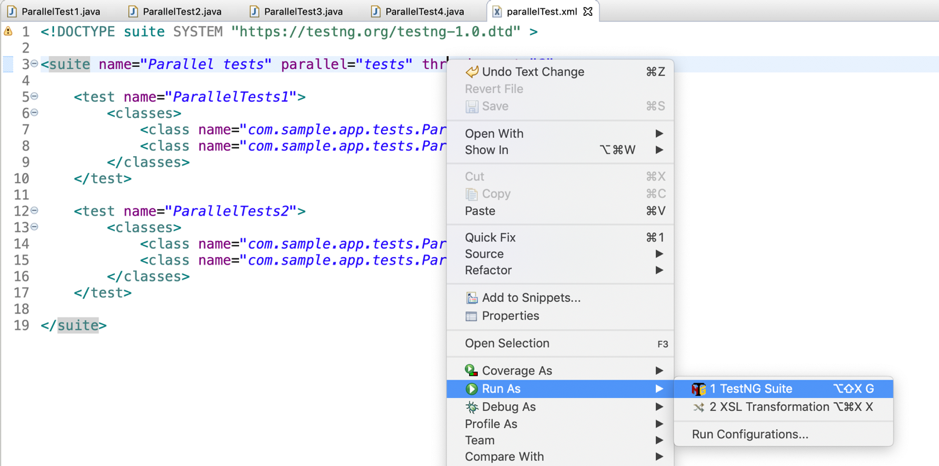
Create ‘parallelTest.xml’ file in the same package where the test classes are defined.

parallelTest.xml
<!DOCTYPE suite SYSTEM "https://testng.org/testng-1.0.dtd" >

<suite name="Parallel tests" parallel="tests" thread-count="2">

  <test name="ParallelTests1">
    <classes>
      <class name="com.sample.app.tests.ParallelTest1"></class>
      <class name="com.sample.app.tests.ParallelTest2"></class>
    </classes>
  </test>

  <test name="ParallelTests2">
    <classes>
      <class name="com.sample.app.tests.ParallelTest3"></class>
      <class name="com.sample.app.tests.ParallelTest4"></class>
    </classes>
  </test>

</suite>

How to run the test suite?
Right click on parallelTest.xml -> Run As -> TestNG Suite.


You will get below messages in console.

ParallelTest1_a is executed by : TestNG-tests-1
ParallelTest3_a is executed by : TestNG-tests-2
ParallelTest3_b is executed by : TestNG-tests-2
ParallelTest3_c is executed by : TestNG-tests-2
ParallelTest1_b is executed by : TestNG-tests-1
ParallelTest3_d is executed by : TestNG-tests-2
ParallelTest3_e is executed by : TestNG-tests-2
ParallelTest1_c is executed by : TestNG-tests-1
ParallelTest4_a is executed by : TestNG-tests-2
ParallelTest1_d is executed by : TestNG-tests-1
ParallelTest4_b is executed by : TestNG-tests-2
ParallelTest4_c is executed by : TestNG-tests-2
ParallelTest4_d is executed by : TestNG-tests-2
ParallelTest1_e is executed by : TestNG-tests-1
ParallelTest4_e is executed by : TestNG-tests-2
ParallelTest2_a is executed by : TestNG-tests-1
ParallelTest2_b is executed by : TestNG-tests-1
ParallelTest2_c is executed by : TestNG-tests-1
ParallelTest2_d is executed by : TestNG-tests-1
ParallelTest2_e is executed by : TestNG-tests-1


Previous                                                    Next                                                    Home

Monday, 23 August 2021

Junit5: @TestFactory: Dynamic Tests

DynamicTest is a test case generated at runtime, which is composed of a display name and an Executable.

@API(status = MAINTAINED, since = "5.3")
public class DynamicTest extends DynamicNode {

	public static DynamicTest dynamicTest(String displayName, Executable executable) {
		return new DynamicTest(displayName, null, executable);
	}

	public static DynamicTest dynamicTest(String displayName, URI testSourceUri, Executable executable) {
		return new DynamicTest(displayName, testSourceUri, executable);
	}

	.......
	.......

}


What is Executable?

Executable is a @FunctionalInterface, which means that the implementations of dynamic tests can be provided as lambda expressions or method references.


How to create dynamic tests?

Dynamic tests are created using factory methods. @TestFactory method itself is not a test case, it is a factory of test cases. A @TestFactory method must return a Stream, collection, iterator or iterable of DynamicTest instances.


Example


@TestFactory
Collection<DynamicTest> dynamicTestsFromCollection() {
	return Arrays.asList(
			dynamicTest("1st dynamic test", () -> assertEquals("olleh", reverseString("hello"))),
			dynamicTest("2nd dynamic test", () -> assertEquals(4, sum(2, 2))),
			dynamicTest("3rd dynamic test", () -> assertEquals(5, length("Hello"))));
}


Above snippet create 3 dynamic tests.


Find the below working application.


DynamicTestDemo1.java

package com.sample.app;

import static org.junit.jupiter.api.Assertions.assertEquals;
import static org.junit.jupiter.api.DynamicTest.dynamicTest;

import java.util.Arrays;
import java.util.Collection;

import org.junit.jupiter.api.DynamicTest;
import org.junit.jupiter.api.TestFactory;

public class DynamicTestDemo1 {

	@TestFactory
	Collection<DynamicTest> dynamicTestsFromCollection() {
		return Arrays.asList(
				dynamicTest("1st dynamic test", () -> assertEquals("olleh", reverseString("hello"))),
				dynamicTest("2nd dynamic test", () -> assertEquals(4, sum(2, 2))),
				dynamicTest("3rd dynamic test", () -> assertEquals(5, length("Hello"))));
	}

	private static String reverseString(String str) {
		return new StringBuilder().append(str).reverse().toString();
	}

	private static int sum(int a, int b) {
		return a + b;
	}

	private static int length(String str) {
		if (str == null)
			return 0;
		return str.length();
	}

}

  Run above test class, you can observe three tests are executed in junit window.


Some more examples to understand dynamic tests.


Example 1: Dynamic tests from a collection.

@TestFactory
Collection<DynamicTest> dynamicTestsFromCollection() {
	return Arrays.asList(
			dynamicTest("1st dynamic test", () -> assertEquals("olleh", reverseString("hello"))),
			dynamicTest("2nd dynamic test", () -> assertEquals(4, sum(2, 2))),
			dynamicTest("3rd dynamic test", () -> assertEquals(5, length("Hello"))));
}


Example 2: Dynamic test from an iterable.

@TestFactory
Iterable<DynamicTest> dynamicTestsFromIterable() {
	return Arrays.asList(
			dynamicTest("1st dynamic test", () -> assertEquals("olleh", reverseString("hello"))),
			dynamicTest("2nd dynamic test", () -> assertEquals(4, sum(2, 2))),
			dynamicTest("3rd dynamic test", () -> assertEquals(5, length("Hello"))));
}


Example 3: Dynamic test from iterator.

@TestFactory
Iterator<DynamicTest> dynamicTestsFromIterator() {
	return Arrays.asList(
			dynamicTest("1st dynamic test", () -> assertEquals("olleh", reverseString("hello"))),
			dynamicTest("2nd dynamic test", () -> assertEquals(4, sum(2, 2))),
			dynamicTest("3rd dynamic test", () -> assertEquals(5, length("Hello")))).iterator();
}


Example 4: Dynamic test from an array.

@TestFactory
DynamicTest[] dynamicTestsFromArray() {
	return new DynamicTest[] {
			dynamicTest("1st dynamic test", () -> assertEquals("olleh", reverseString("hello"))),
			dynamicTest("2nd dynamic test", () -> assertEquals(4, sum(2, 2))),
			dynamicTest("3rd dynamic test", () -> assertEquals(5, length("Hello")))};
}


Example 5: Dynamic test from a stream.

@TestFactory
Stream<DynamicTest> dynamicTestsFromIntStream() {
	 return IntStream
			 .iterate(0, n -> n + 2)
			 .limit(5)
			 .mapToObj(n -> dynamicTest("isEven : " + n, () -> assertTrue(n % 2 == 0)));
}


Find the below working application.


DynamicTestDemo2.java

package com.sample.app;

import static org.junit.jupiter.api.Assertions.assertEquals;
import static org.junit.jupiter.api.Assertions.assertTrue;
import static org.junit.jupiter.api.DynamicTest.dynamicTest;

import java.util.Arrays;
import java.util.Collection;
import java.util.Iterator;
import java.util.stream.IntStream;
import java.util.stream.Stream;

import org.junit.jupiter.api.DynamicTest;
import org.junit.jupiter.api.TestFactory;

public class DynamicTestDemo2 {

	@TestFactory
	Collection<DynamicTest> dynamicTestsFromCollection() {
		return Arrays.asList(
				dynamicTest("1st dynamic test", () -> assertEquals("olleh", reverseString("hello"))),
				dynamicTest("2nd dynamic test", () -> assertEquals(4, sum(2, 2))),
				dynamicTest("3rd dynamic test", () -> assertEquals(5, length("Hello"))));
	}
	
	@TestFactory
	Iterable<DynamicTest> dynamicTestsFromIterable() {
		return Arrays.asList(
				dynamicTest("1st dynamic test", () -> assertEquals("olleh", reverseString("hello"))),
				dynamicTest("2nd dynamic test", () -> assertEquals(4, sum(2, 2))),
				dynamicTest("3rd dynamic test", () -> assertEquals(5, length("Hello"))));
	}
	
	@TestFactory
	Iterator<DynamicTest> dynamicTestsFromIterator() {
		return Arrays.asList(
				dynamicTest("1st dynamic test", () -> assertEquals("olleh", reverseString("hello"))),
				dynamicTest("2nd dynamic test", () -> assertEquals(4, sum(2, 2))),
				dynamicTest("3rd dynamic test", () -> assertEquals(5, length("Hello")))).iterator();
	}
	
	@TestFactory
	DynamicTest[] dynamicTestsFromArray() {
		return new DynamicTest[] {
				dynamicTest("1st dynamic test", () -> assertEquals("olleh", reverseString("hello"))),
				dynamicTest("2nd dynamic test", () -> assertEquals(4, sum(2, 2))),
				dynamicTest("3rd dynamic test", () -> assertEquals(5, length("Hello")))};
	}
	
	 @TestFactory
	 Stream<DynamicTest> dynamicTestsFromIntStream() {
		 return IntStream
				 .iterate(0, n -> n + 2)
				 .limit(5)
				 .mapToObj(n -> dynamicTest("isEven : " + n, () -> assertTrue(n % 2 == 0)));
	}

	private static String reverseString(String str) {
		return new StringBuilder().append(str).reverse().toString();
	}

	private static int sum(int a, int b) {
		return a + b;
	}

	private static int length(String str) {
		if (str == null)
			return 0;
		return str.length();
	}

}


Run above test class, you will see the results in junit window.


Previous                                                    Next                                                    Home