Tuesday, 31 August 2021

Junit5: Test Suite: SelectClasses: Specify classes to execute

@SelectClasses specifies the classes to select when running a test suite on the JUnit Platform.


Example

@RunWith(JUnitPlatform.class)
@SuiteDisplayName("JUnit Platform Suite Demo")
@SelectClasses({ DummyTest.class, ArithmeticTest.class })
public class SelectClassesDemo1 {

}


Find the below working application.


ArithmeticTest.java

package com.sample.app.arithmetic;

import static org.junit.jupiter.api.Assertions.assertEquals;

import org.junit.jupiter.api.Test;

public class ArithmeticTest {

    private static int sum(int a, int b) {
        return a + b;
    }

    @Test
    public void test1() {
        assertEquals(5, sum(2, 3));
    }

}


DummyTest.java

package com.sample.app.dummy;

import static org.junit.jupiter.api.Assertions.assertTrue;

import org.junit.jupiter.api.Test;

public class DummyTest {

    @Test
    public void test1() {
        assertTrue(true);
    }
}


SelectClassesDemo1.java

package com.sample.app.suite;

import org.junit.platform.runner.JUnitPlatform;
import org.junit.platform.suite.api.SelectClasses;
import org.junit.platform.suite.api.SuiteDisplayName;
import org.junit.runner.RunWith;

import com.sample.app.arithmetic.ArithmeticTest;
import com.sample.app.dummy.DummyTest;

@RunWith(JUnitPlatform.class)
@SuiteDisplayName("JUnit Platform Suite Demo")
@SelectClasses({ DummyTest.class, ArithmeticTest.class })
public class SelectClassesDemo1 {

}


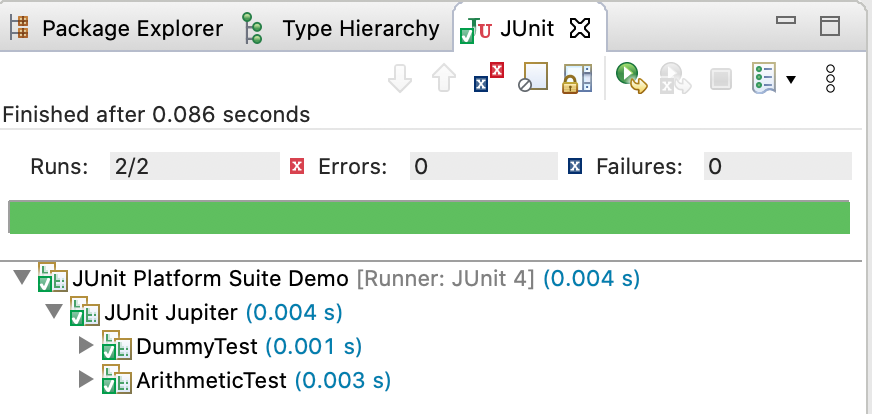
Run the test class ‘SelectClassesDemo1’, you can observe that the tests in the classes DummyTest and ArithmeticTest gets executed.


Previous                                                    Next                                                    Home

Sunday, 29 August 2021

Junit5: Test suite: SelectPackages: Select packages to run test cases

@SelectPackages annotation specifies the names of packages to select when running a test suite on the JUnit Platform. @SelectPackages run the test classes in the packages and sub packages.


Example

@RunWith(JUnitPlatform.class)
@SuiteDisplayName("JUnit Platform Suite Demo")
@SelectPackages({"com.sample.app.dummy", "com.sample.app.arithmetic"})
public class SuiteDemo1 {

}

‘SuiteDemo1’ class run the tests methods located in the packages "com.sample.app.dummy", and "com.sample.app.arithmetic".


Find the below working application.


ArithmeticTest.java

package com.sample.app.arithmetic;

import static org.junit.jupiter.api.Assertions.assertEquals;

import org.junit.jupiter.api.Test;

public class ArithmeticTest {

    private static int sum(int a, int b) {
        return a + b;
    }

    @Test
    public void test1() {
        assertEquals(5, sum(2, 3));
    }

}


DummyTest.java

package com.sample.app.dummy;

import static org.junit.jupiter.api.Assertions.assertTrue;

import org.junit.jupiter.api.Test;

public class DummyTest {

    @Test
    public void test1() {
        assertTrue(true);
    }
}

SuiteDemo1.java

package com.sample.app.suite;

import org.junit.platform.runner.JUnitPlatform;
import org.junit.platform.suite.api.SelectPackages;
import org.junit.platform.suite.api.SuiteDisplayName;
import org.junit.runner.RunWith;

@RunWith(JUnitPlatform.class)
@SuiteDisplayName("JUnit Platform Suite Demo")
@SelectPackages({"com.sample.app.dummy", "com.sample.app.arithmetic"})
public class SuiteDemo1 {

}


Run SuiteDemo1.java, you will see the test methods executed in junit window.


Note

By default, it will only include test classes whose names either begin with Test or end with Test or Tests.


Previous                                                    Next                                                    Home

Neo4j: Logical or Boolean Operators

Neo4j support following Boolean operators.

a.   AND

b.   OR

c.    NOT

d.   IN


In this post, I am going to explain about AND, OR operators.


Get all the persons whose city is Bangalore and designation is Employee

MATCH(n:Person) WHERE n.city="Bangalore" OR n.designation="Employee" RETURN n


Get all the employees whose age is 32 or designation is Manager

MATCH(n:Person) WHERE n.age=32 OR n.designation="Manager" RETURN n


Let’s see the same with an example.


Step 1: Open neo4j browser by hitting following url in browser.

http://localhost:7474/browser/


Step 2: Insert data by executing below query.

CREATE (p1:Person{name: "Rama Krishna", age: 32, city: "Bangalore", male: true, designation: "CEO"}),
(p2:Person{name: "Murali", age: 32, city: "Hyderabad", male: true, designation: "Vice President"}),
(p3:Person{name: "Gopi", age: 34, city: "Chennai", male: true, designation: "Vice President"}),
(p4:Person{name: "Kiran", age: 28, city: "Bangalore", male: true, designation: "Director"}),
(p5:Person{name: "Siva", age: 45, city: "Hyderabad", male: true, designation: "Director"}),
(p6:Person{name: "Kiran", age: 36, city: "Hyderabad", male: true, designation: "Manager"}),
(p7:Person{name: "Ritweek", age: 23, city: "Bangalore", male: true, designation: "Manager"}),
(p8:Person{name: "Sudheer", age: 24, city: "Chennai", male: true, designation: "Manager"}),
(p9:Person{name: "Naveen", age: 37, city: "Bangalore", male: true, designation: "Employee"}),
(p10:Person{name: "Sailaja", age: 31, city: "Hyderabad", female: true, designation: "Employee"}),
(p11:Person{name: "Harika", age: 36, city: "Bangalore", female: true, designation: "Employee"}),
(p12:Person{name: "Brahmam", age: 41, city: "Bangalore", male: true, designation: "Employee"}),
(office1:Location{name: "Pluto", city: "Bangalore"}),
(office2:Location{name: "Mars", city: "Chennai"})
MERGE (p2)-[:REPORT_TO{from: 2014, description: "reports to"}]->(p1)
MERGE (p3)-[:REPORT_TO{from: 2016, description: "reports to"}]->(p1)
MERGE (p4)-[:REPORT_TO{from: 1997, description: "reports to"}]->(p2)
MERGE (p5)-[:REPORT_TO{from: 1997, description: "reports to"}]->(p3)
MERGE (p6)-[:REPORT_TO{from: 2001, description: "reports to"}]->(p4)
MERGE (p7)-[:REPORT_TO{from: 2009, description: "reports to"}]->(p4)
MERGE (p8)-[:REPORT_TO{from: 1998, description: "reports to"}]->(p5)
MERGE (p9)-[:REPORT_TO{from: 2003, description: "reports to"}]->(p6)
MERGE (p10)-[:REPORT_TO{from: 2004, description: "reports to"}]->(p6)
MERGE (p11)-[:REPORT_TO{from: 2008, description: "reports to"}]->(p7)
MERGE (p12)-[:REPORT_TO{from: 2019, description: "reports to"}]->(p8)
MERGE (p2)-[:FRIEND_TO{from: 2014, description: "friend to"}]->(p1)
MERGE (p10)-[:FRIEND_TO{from: 2014, description: "friend to"}]->(p8)
MERGE (p7)-[:FRIEND_TO{from: 2014, description: "friend to"}]->(p9)
MERGE (p3)-[:RELATIVE_TO{from: 2014, description: "relative to"}]->(p4)
RETURN p1, p2, p3, p4, p5, p6, p7, p8, p9, p10, p11, p12, office1, office2


Get all the persons whose city is Bangalore and designation is Employee

MATCH(n:Person) WHERE n.city="Bangalore" AND n.designation="Employee" RETURN n


Previous                                                    Next                                                    Home

ArangoDB: Remove by example

'collection.removeByExample(example)' method is used to remove documents by example.


Signature

collection.removeByExample(example)

collection.removeByExample(document, waitForSync)

collection.removeByExample(document, waitForSync, limit)


If you set ‘waitForSync’ parameter to true, then ArangoDB enables the operation to be in force sync with disk. If the waitForSync parameter is not specified or set to false, then the collection’s default waitForSync behavior is applied.


‘limit’ parameter is used to limit number of removals.


Let’s experiment with an example.

127.0.0.1:8529@abc_org> db.user.toArray()
[ 
  { 
    "_key" : "17095", 
    "_id" : "user/17095", 
    "_rev" : "_cRe1H-6---", 
    "id" : 4, 
    "firstName" : "Venkat", 
    "lastName" : "Ptr", 
    "age" : 35 
  }, 
  { 
    "_key" : "23404", 
    "_id" : "user/23404", 
    "_rev" : "_cRhMFQ6---", 
    "id" : 5, 
    "firstName" : "Gireesh", 
    "lastName" : "Amara", 
    "age" : 30 
  }, 
  { 
    "_key" : "31893", 
    "_id" : "user/31893", 
    "_rev" : "_cR9QHBy---", 
    "firstName" : "Shanmuk", 
    "lastName" : "Rao", 
    "age" : 33, 
    "id" : 6 
  }, 
  { 
    "_key" : "31916", 
    "_id" : "user/31916", 
    "_rev" : "_cR9Qdi2---", 
    "firstName" : "Jaideep", 
    "lastName" : "Gera", 
    "age" : 35, 
    "id" : 7 
  }, 
  { 
    "_key" : "31930", 
    "_id" : "user/31930", 
    "_rev" : "_cR9QxTy---", 
    "firstName" : "Sailu", 
    "lastName" : "PTR", 
    "age" : 36, 
    "id" : 8 
  }, 
  { 
    "_key" : "31944", 
    "_id" : "user/31944", 
    "_rev" : "_cR9RJMy---", 
    "firstName" : "Chamu", 
    "lastName" : "M", 
    "age" : 33, 
    "id" : 9 
  }, 
  { 
    "_key" : "31958", 
    "_id" : "user/31958", 
    "_rev" : "_cR9RbtC---", 
    "firstName" : "Ravi", 
    "lastName" : "Chandra", 
    "age" : 35, 
    "id" : 10 
  } 
]


As you see above snippet, user collection has 3 documents with the age 35.


Let’s delete any 2 documents with age 35.

db.user.removeByExample({"age": 35}, false, 2)

127.0.0.1:8529@abc_org> db.user.removeByExample({"age": 35}, false, 2)
2

127.0.0.1:8529@abc_org> db.user.toArray()
[ 
  { 
    "_key" : "23404", 
    "_id" : "user/23404", 
    "_rev" : "_cRhMFQ6---", 
    "id" : 5, 
    "firstName" : "Gireesh", 
    "lastName" : "Amara", 
    "age" : 30 
  }, 
  { 
    "_key" : "31893", 
    "_id" : "user/31893", 
    "_rev" : "_cR9QHBy---", 
    "firstName" : "Shanmuk", 
    "lastName" : "Rao", 
    "age" : 33, 
    "id" : 6 
  }, 
  { 
    "_key" : "31930", 
    "_id" : "user/31930", 
    "_rev" : "_cR9QxTy---", 
    "firstName" : "Sailu", 
    "lastName" : "PTR", 
    "age" : 36, 
    "id" : 8 
  }, 
  { 
    "_key" : "31944", 
    "_id" : "user/31944", 
    "_rev" : "_cR9RJMy---", 
    "firstName" : "Chamu", 
    "lastName" : "M", 
    "age" : 33, 
    "id" : 9 
  }, 
  { 
    "_key" : "31958", 
    "_id" : "user/31958", 
    "_rev" : "_cR9RbtC---", 
    "firstName" : "Ravi", 
    "lastName" : "Chandra", 
    "age" : 35, 
    "id" : 10 
  } 
]


Previous                                                    Next                                                    Home

Saturday, 28 August 2021

ArangoDB: Remove documents by keys

'collection.removeByKeys(keys)' method is used to remove the documents by keys.


Signature

collection.removeByKeys(keys)


This method return the object that contains information about number of removed documents and number of ignored documents.


What if there is no document associated with given key?

Simply ignored, no exception is thrown.


Let’s experiment with an example.

127.0.0.1:8529@abc_org> db.user.toArray()
[ 
  { 
    "_key" : "17091", 
    "_id" : "user/17091", 
    "_rev" : "_cRe1GKu---", 
    "id" : 2, 
    "firstName" : "Gopi", 
    "lastName" : "Battu", 
    "age" : 33 
  }, 
  { 
    "_key" : "17095", 
    "_id" : "user/17095", 
    "_rev" : "_cRe1H-6---", 
    "id" : 4, 
    "firstName" : "Venkat", 
    "lastName" : "Ptr", 
    "age" : 35 
  }, 
  { 
    "_key" : "23404", 
    "_id" : "user/23404", 
    "_rev" : "_cRhMFQ6---", 
    "id" : 5, 
    "firstName" : "Gireesh", 
    "lastName" : "Amara", 
    "age" : 30 
  }, 
  { 
    "_key" : "user-7", 
    "_id" : "user/user-7", 
    "_rev" : "_cRhodqC---", 
    "id" : 7, 
    "firstName" : "Joel", 
    "lastName" : "Battu", 
    "age" : 35, 
    "hobbies" : [ 
      "cricket" 
    ] 
  } 
]

Remove the documents with keys 17091, 12345, user-7.

127.0.0.1:8529@abc_org> db.user.removeByKeys(["17091", "12345", "user-7"])
{ 
  "removed" : 2, 
  "ignored" : 1 
}


Previous                                                    Next                                                    Home

ArangoDB: Remove a document


‘collection.remove()’ method is used to remove a document from the collection.


Signature

collection.remove(selector)

collection.remove(selector, options)


‘collection.remove( )’ method removes a document described by the selector from the collection. ‘selector’ is a json object that contain either _id or _key attribute to uniquely identify the document within the collection.


Can I provide _rev attribute in the selector object?

Yes, you can provide _rev attribute. When selector contains _rev attribute, replace method first checks that the specified revision is the current revision of that document or not. If not, error is thrown.


‘options’ is a json object that contain following attributes.


Attribute

Description

waitForSync

If it is set to true, ArangoDB force the synchronizaiton of this operation to the disk.


If the waitForSync parameter is not specified or set to false, then the collection’s default waitForSync behavior is applied.

overwrite

If this flag is set to true, a _rev attribute in the selector is ignored.

returnOld

If this flag is set to true, then the previous revision of the document is returned in the output.

silent

If this flag is set to true, no output is returned.


Let’s experiment with an example.

127.0.0.1:8529@abc_org> db.user.toArray()
[ 
  { 
    "_key" : "17089", 
    "_id" : "user/17089", 
    "_rev" : "_cRe1GKq---", 
    "id" : 1, 
    "firstName" : "Sailu", 
    "lastName" : "Ptr", 
    "age" : 32 
  }, 
  { 
    "_key" : "17091", 
    "_id" : "user/17091", 
    "_rev" : "_cRe1GKu---", 
    "id" : 2, 
    "firstName" : "Gopi", 
    "lastName" : "Battu", 
    "age" : 33 
  }, 
  { 
    "_key" : "17093", 
    "_id" : "user/17093", 
    "_rev" : "_cRe1GKy---", 
    "id" : 3, 
    "firstName" : "Krishna", 
    "lastName" : "Gurram", 
    "age" : 32 
  }, 
  { 
    "_key" : "17095", 
    "_id" : "user/17095", 
    "_rev" : "_cRe1H-6---", 
    "id" : 4, 
    "firstName" : "Venkat", 
    "lastName" : "Ptr", 
    "age" : 35 
  }, 
  { 
    "_key" : "23404", 
    "_id" : "user/23404", 
    "_rev" : "_cRhMFQ6---", 
    "id" : 5, 
    "firstName" : "Gireesh", 
    "lastName" : "Amara", 
    "age" : 30 
  }, 
  { 
    "_key" : "user-7", 
    "_id" : "user/user-7", 
    "_rev" : "_cRhodqC---", 
    "id" : 7, 
    "firstName" : "Joel", 
    "lastName" : "Battu", 
    "age" : 35, 
    "hobbies" : [ 
      "cricket" 
    ] 
  }, 
  { 
    "_key" : "23418", 
    "_id" : "user/23418", 
    "_rev" : "_cRjYiwi---", 
    "name" : "Manohar Amara", 
    "hobbies" : [ 
      "football", 
      "trekking" 
    ], 
    "age" : 34 
  } 
]


Example 1: Remove the document with _key 17089.

127.0.0.1:8529@abc_org> db.user.remove("17089")
{ 
  "_id" : "user/17089", 
  "_key" : "17089", 
  "_rev" : "_cRe1GKq---" 
}


Example 2: Remove the document with _id user/17093.

127.0.0.1:8529@abc_org> db.user.remove({"_id": "user/17093"})
{ 
  "_id" : "user/17093", 
  "_key" : "17093", 
  "_rev" : "_cRe1GKy---" 
}

Example 3: Remove the document with _key 23418 and print the removed document.

127.0.0.1:8529@abc_org> db.user.remove("23418", {"returnOld": true})
{ 
  "_id" : "user/23418", 
  "_key" : "23418", 
  "_rev" : "_cRjYiwi---", 
  "old" : { 
    "_key" : "23418", 
    "_id" : "user/23418", 
    "_rev" : "_cRjYiwi---", 
    "name" : "Manohar Amara", 
    "hobbies" : [ 
      "football", 
      "trekking" 
    ], 
    "age" : 34 
  } 
}


Previous                                                    Next                                                    Home