Saturday, 29 December 2018

Apache Camel: Content based routing

In this post, I am going to explain, how can you perform content based routing. Here the content can be anything like data headers, file name, content of the file, file modification date etc.,

Create new maven project ‘camelContentRouting’ in eclipse. If you do not know, how to create maven project, refer my previous tutorials.

Camel provides number predicates to route the information based on given condition.

from("file:C:\\Users\\Public\\demo?noop=true")
.choice()
.when(header("CamelFileName")
.endsWith("xlsx"))
.to("file:C:\\Users\\Public\\demoCopyXlsFiles");

Above snippet copy all xls file to ‘demoCopyXlsFiles’ folder.

Project structure looks like below.

pom.xml
<project xmlns="http://maven.apache.org/POM/4.0.0" xmlns:xsi="http://www.w3.org/2001/XMLSchema-instance" xsi:schemaLocation="http://maven.apache.org/POM/4.0.0 http://maven.apache.org/xsd/maven-4.0.0.xsd">
  <modelVersion>4.0.0</modelVersion>
  <groupId>camelContentRouting</groupId>
  <artifactId>camelContentRouting</artifactId>
  <version>1</version>
  
   <dependencies>
  <!-- https://mvnrepository.com/artifact/org.apache.camel/camel-core -->
  <dependency>
   <groupId>org.apache.camel</groupId>
   <artifactId>camel-core</artifactId>
   <version>2.22.1</version>
  </dependency>

 </dependencies>
</project>


FileCopyRoute.java
package com.sample.app.routes;

import org.apache.camel.builder.RouteBuilder;

public class FileCopyRoute extends RouteBuilder {

 @Override
 public void configure() throws Exception {
  from("file:C:\\Users\\Public\\demo?noop=true").choice().when(header("CamelFileName").endsWith("xlsx"))
    .to("file:C:\\Users\\Public\\demoCopyXlsFiles");
 }

}

Application.java

package com.sample.app;

import java.util.concurrent.TimeUnit;

import org.apache.camel.CamelContext;
import org.apache.camel.impl.DefaultCamelContext;

import com.sample.app.routes.FileCopyRoute;

public class Application {
 public static void main(String args[]) throws Exception {
  CamelContext context = new DefaultCamelContext();

  context.addRoutes(new FileCopyRoute());

  context.start();

  TimeUnit.MINUTES.sleep(1);

  context.stop();
 }
}


Previous                                                 Next                                                 Home

Apache Camel: Exploring Processor interface

Processor is used to process the message exchange.

How to define custom processor?
You can define the custom processor by implementing 'org.apache.camel.Processor' interface.

public interface Processor {
    void process(Exchange exchange) throws Exception;
}


Let’s create a custom processor, that logs the message.

public class LogProcessor implements Processor {

         @Override
         public void process(Exchange exchange) throws Exception {
                  String message = exchange.getIn().getBody(String.class);

                  System.out.println("****Reading the message from exchnage****");
                  System.out.println(message);
         }

}

You can insert the processor into the route.
from("SourceURL").process(myProc).to("TargetURL");

Example
from("file:C:\\Users\\Public\\demo?noop=true").process(new LogProcessor()).to("file:C:\\Users\\Public\\demoCopy");

Find the below working application.

LogProcessor.java
package com.sample.app.processor;

import org.apache.camel.Exchange;
import org.apache.camel.Processor;

public class LogProcessor implements Processor {

 @Override
 public void process(Exchange exchange) throws Exception {
  String message = exchange.getIn().getBody(String.class);

  System.out.println("****Reading the message from exchnage****");
  System.out.println(message);
 }

}

Application.java

package com.sample.app;

import java.util.concurrent.TimeUnit;

import org.apache.camel.CamelContext;
import org.apache.camel.builder.RouteBuilder;
import org.apache.camel.impl.DefaultCamelContext;

import com.sample.app.processor.LogProcessor;

public class Application {

 public static class FileCopyRoute extends RouteBuilder {

  @Override
  public void configure() throws Exception {
   from("file:C:\\Users\\Public\\demo?noop=true").process(new LogProcessor())
     .to("file:C:\\Users\\Public\\demoCopy");
  }

 }

 public static void main(String args[]) throws Exception {
  CamelContext context = new DefaultCamelContext();

  context.addRoutes(new FileCopyRoute());

  context.start();

  TimeUnit.MINUTES.sleep(1);

  context.stop();
 }
}


Previous                                                 Next                                                 Home

Apache Camel: Exploring Message interface

'org.apache.camel.Message' interface represents an inbound (or) outbound message that is encapsulated in an exchange.

A message object contains message body, message headers and message attachments.

Below is the definition of Message interface.

Message.java
public interface Message {

    String getMessageId();
    void setMessageId(String messageId);

    Exchange getExchange();

  
    boolean isFault();
    void setFault(boolean fault);


    Object getHeader(String name);
    Object getHeader(String name, Object defaultValue);
    Object getHeader(String name, Supplier<Object> defaultValueSupplier);
    <T> T getHeader(String name, Class<T> type);
    <T> T getHeader(String name, Object defaultValue, Class<T> type);
    <T> T getHeader(String name, Supplier<Object> defaultValueSupplier, Class<T> type);
    void setHeader(String name, Object value);
    Object removeHeader(String name);
    boolean removeHeaders(String pattern);
    boolean removeHeaders(String pattern, String... excludePatterns);
    Map<String, Object> getHeaders();
    void setHeaders(Map<String, Object> headers);
    boolean hasHeaders();

    Object getBody();
    Object getMandatoryBody() throws InvalidPayloadException;
    <T> T getBody(Class<T> type);
    <T> T getMandatoryBody(Class<T> type) throws InvalidPayloadException;
    void setBody(Object body);
    <T> void setBody(Object body, Class<T> type);
 
    Message copy();
    void copyFrom(Message message);
    void copyFromWithNewBody(Message message, Object newBody);
 
    void copyAttachments(Message message);
    DataHandler getAttachment(String id);
    Attachment getAttachmentObject(String id);
    Set<String> getAttachmentNames();
    void removeAttachment(String id);
    void addAttachment(String id, DataHandler content);
    void addAttachmentObject(String id, Attachment content);
    Map<String, DataHandler> getAttachments();
    Map<String, Attachment> getAttachmentObjects();
    void setAttachments(Map<String, DataHandler> attachments);
    void setAttachmentObjects(Map<String, Attachment> attachments);
    boolean hasAttachments();
}


Application.java

package com.sample.app;

import java.util.Map;
import java.util.concurrent.TimeUnit;

import org.apache.camel.CamelContext;
import org.apache.camel.Exchange;
import org.apache.camel.Processor;
import org.apache.camel.builder.RouteBuilder;
import org.apache.camel.impl.DefaultCamelContext;

import java.util.*;

public class Application {

 private static void printMap(Map<String, Object> map) {
  Set<String> properties = map.keySet();

  for (String property : properties) {
   System.out.println(property + " : " + map.get(property));
  }
 }

 public static class FileCopyRoute extends RouteBuilder {

  @Override
  public void configure() throws Exception {
   from("file:C:\\Users\\Public\\demo?noop=true").process(new Processor() {

    @Override
    public void process(Exchange exchange) throws Exception {
     Map<String, Object> headers = exchange.getMessage().getHeaders();
     printMap(headers);
    }

   }).to("file:C:\\Users\\Public\\demoCopy");
  }

 }

 public static void main(String args[]) throws Exception {
  CamelContext context = new DefaultCamelContext();

  context.addRoutes(new FileCopyRoute());

  context.start();

  TimeUnit.MINUTES.sleep(1);

  context.stop();
 }
}

Sample Output
breadcrumbId : ID-INLN50911363A-1540830736880-0-1
CamelFileAbsolute : true
CamelFileAbsolutePath : C:\Users\Public\demo\helloWorld.txt
CamelFileLastModified : 1540827492847
CamelFileLength : 45
CamelFileName : helloWorld.txt
CamelFileNameConsumed : helloWorld.txt
CamelFileNameOnly : helloWorld.txt
CamelFileParent : C:\Users\Public\demo
CamelFilePath : C:\Users\Public\demo\helloWorld.txt
CamelFileRelativePath : helloWorld.txt


Previous                                                 Next                                                 Home

Apache Camel: Exploring Exchange interface

An Exchange is a container that holds the message and metadata associated with the message, Exchnage also contains temporary out message that represents the reply (out message).


If an Exchange failed during routing the Exception that caused the failure is stored and accessible via the getException() method.

out and in messages
The rule Camel uses is to take the out Message produced by the previous Processor and set it as the in for the next Processor.
If the previous Processor did not produce an out, then the in of the previous Processor is sent as the next in. At the end of the processing chain, depending on the Message Exchange Pattern the last out (or in of no out available) is sent by the Consumer back to the original caller.

Below snippet convert the data to uppercase.

from("file:C:\\Users\\Public\\demo?noop=true").process(new Processor() {

         @Override
         public void process(Exchange exchange) throws Exception {
                  String messageBody = exchange.getIn().getBody(String.class);

                  System.out.println("\nmessage before processing");
                  System.out.println(messageBody);

                  messageBody = messageBody.toUpperCase();

                  exchange.getIn().setBody(messageBody, String.class);
         }

}).to("file:C:\\Users\\Public\\demoCopy").process(new Processor() {

         @Override
         public void process(Exchange exchange) throws Exception {
                  System.out.println("\n\nmessage after processing");
         System.out.println(exchange.getIn().getBody(String.class));        
         }
});

Find the below working application.

Application.java
package com.sample.app;

import java.util.concurrent.TimeUnit;

import org.apache.camel.CamelContext;
import org.apache.camel.Exchange;
import org.apache.camel.Processor;
import org.apache.camel.builder.RouteBuilder;
import org.apache.camel.impl.DefaultCamelContext;

public class Application {

 public static class FileCopyRoute extends RouteBuilder {

  @Override
  public void configure() throws Exception {
   from("file:C:\\Users\\Public\\demo?noop=true").process(new Processor() {

    @Override
    public void process(Exchange exchange) throws Exception {
     String messageBody = exchange.getIn().getBody(String.class);

     System.out.println("\nmessage before processing");
     System.out.println(messageBody);

     messageBody = messageBody.toUpperCase();

     exchange.getIn().setBody(messageBody, String.class);
    }

   }).to("file:C:\\Users\\Public\\demoCopy").process(new Processor() {

    @Override
    public void process(Exchange exchange) throws Exception {
     System.out.println("\n\nmessage after processing");
     System.out.println(exchange.getIn().getBody(String.class)); 
    }
   });
  }

 }

 public static void main(String args[]) throws Exception {
  CamelContext context = new DefaultCamelContext();

  context.addRoutes(new FileCopyRoute());

  context.start();

  TimeUnit.MINUTES.sleep(1);

  context.stop();
 }
}

Output
message before processing
Hello How are you
I am fine, thannk you!!!!!


message after processing
HELLO HOW ARE YOU
I AM FINE, THANNK YOU!!!!!

Exchange interface provides 'getProperties' method, it returns all of the properties associated with the exchange.

‘exchange.getIn().getHeaders()’ method return all the headers associated with the message.

Application.java
package com.sample.app;

import java.util.Map;
import java.util.concurrent.TimeUnit;

import org.apache.camel.CamelContext;
import org.apache.camel.Exchange;
import org.apache.camel.Processor;
import org.apache.camel.builder.RouteBuilder;
import org.apache.camel.impl.DefaultCamelContext;

import java.util.*;

public class Application {

 private static void printMap(Map<String, Object> map) {
  Set<String> properties = map.keySet();

  for (String property : properties) {
   System.out.println(property + " : " + map.get(property));
  }
 }

 public static class FileCopyRoute extends RouteBuilder {

  @Override
  public void configure() throws Exception {
   from("file:C:\\Users\\Public\\demo?noop=true").process(new Processor() {

    @Override
    public void process(Exchange exchange) throws Exception {
     System.out.println("\nProperties are : ");
     printMap(exchange.getProperties());
     
     System.out.println("\nheaders are : ");
     printMap(exchange.getIn().getHeaders());
    }

   }).to("file:C:\\Users\\Public\\demoCopy");
  }

 }

 public static void main(String args[]) throws Exception {
  CamelContext context = new DefaultCamelContext();

  context.addRoutes(new FileCopyRoute());

  context.start();

  TimeUnit.MINUTES.sleep(1);

  context.stop();
 }
}

Sample Output
Properties are : 
CamelBatchSize : 1
CamelMessageHistory : [DefaultMessageHistory[routeId=route1, node=process1]]
CamelBatchComplete : true
CamelExternalRedelivered : false
CamelBatchIndex : 0
CamelFileExchangeFile : GenericFile[C:\Users\Public\demo\helloWorld.txt]
CamelCreatedTimestamp : Mon Oct 29 21:45:06 IST 2018

headers are : 
breadcrumbId : ID-INLN50911363A-1540829704584-0-1
CamelFileAbsolute : true
CamelFileAbsolutePath : C:\Users\Public\demo\helloWorld.txt
CamelFileLastModified : 1540827492847
CamelFileLength : 45
CamelFileName : helloWorld.txt
CamelFileNameConsumed : helloWorld.txt
CamelFileNameOnly : helloWorld.txt
CamelFileParent : C:\Users\Public\demo
CamelFilePath : C:\Users\Public\demo\helloWorld.txt
CamelFileRelativePath : helloWorld.txt

You can use below methods to set, get and remove the properties of exchange.
void setProperty(String name, Object value);
Object removeProperty(String name);
boolean removeProperties(String pattern);
Object getProperty(String name);
Object getProperty(String name, Object defaultValue);
<T> T getProperty(String name, Class<T> type);
<T> T getProperty(String name, Object defaultValue, Class<T> type);


Previous                                                 Next                                                 Home

Friday, 28 December 2018

Apache camel: Sending files from filesystem to jms queue

In this post, I am going to explain how to send files from filesystem to a jms queue using Apache Camel.


What is JMS?
JMS stands for Java Message Service, it is an open standard, that documents common way to create, send, receive and read an enterprise messaging system’s messages.

JMS documents, how the asynchronous communication between enterprise applications takes place.

Why JMS?
Prior to JMS specification, every messaging service vendor has their own implementation of messaging apis, it is quite difficult to a user to migrate from one messaging vendor to other. Developers end up in writing vendor specific implementation. JMS exists to address these issues.

By using JMS client, you can able to connect to any JMS compliant provider applications like Active MQ, Rabbit MQ etc.,

In this post, I am going to use ActiveMQ as the JMS queue.

Setting up ActiveMQ
I would recommend you to go through my below post to setup the activeMQ.

Once you setup activeMQ, loginto the admin console by hitting below url.

Use below credentials to login to the admin console.
UserName: admin
Password: admin

You can see below kind of user interface.


Click on the tab ‘Queues’.

Set queue name as 'camelFileTransfer', and click on Create button.
Queue gets created.


Setting up Eclipse project to transfer the files to ActiveMQ Queue
Open Eclipse.

Right click on Project Explorer -> New -> Other.


In the new wizard section, select the ‘Maven Project’
Click on Next button.
Select the checkbox ‘Create a simple project (skip archetype selection).
Click on Next button.
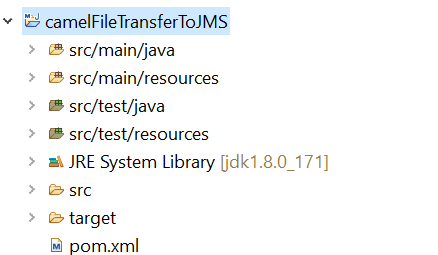
Set the Group Id, Artifact Id as ‘camelFileTransferToJMS´and click on Finish button.

It generates a project structure like below.
Open pom.xml and update the dependencies.

Final pom.xml file looks like below.

pom.xml
<project xmlns="http://maven.apache.org/POM/4.0.0"
 xmlns:xsi="http://www.w3.org/2001/XMLSchema-instance"
 xsi:schemaLocation="http://maven.apache.org/POM/4.0.0 http://maven.apache.org/xsd/maven-4.0.0.xsd">
 <modelVersion>4.0.0</modelVersion>
 <groupId>camelFileTransferToJMS</groupId>
 <artifactId>camelFileTransferToJMS</artifactId>
 <version>1</version>

 <dependencies>
  <!-- https://mvnrepository.com/artifact/org.apache.camel/camel-jms -->
  <dependency>
   <groupId>org.apache.camel</groupId>
   <artifactId>camel-jms</artifactId>
   <version>2.22.1</version>
  </dependency>

  <!-- https://mvnrepository.com/artifact/org.apache.camel/camel-core -->
  <dependency>
   <groupId>org.apache.camel</groupId>
   <artifactId>camel-core</artifactId>
   <version>2.22.1</version>
  </dependency>

  <!-- https://mvnrepository.com/artifact/org.apache.activemq/activemq-all -->
  <dependency>
   <groupId>org.apache.activemq</groupId>
   <artifactId>activemq-all</artifactId>
   <version>5.15.6</version>
  </dependency>

 </dependencies>
</project>

Create a package ‘com.sample.app.routes’ and define the class FileCopyRoute.java.


FileCopyRoute.java
package com.sample.app.routes;

import org.apache.camel.builder.RouteBuilder;

public class FileCopyRoute extends RouteBuilder {

 @Override
 public void configure() throws Exception {
  this.from("file:C:\\Users\\Public\\demo?noop=true").to("demoJMS:queue:camelFileTransfer");
 }

}

Above route copy the files from the directory ‘C:\\Users\\Public\\demo’ to the queue camelFileTransfer.


Application.java
 package com.sample.app;

import java.util.concurrent.TimeUnit;

import javax.jms.ConnectionFactory;

import org.apache.activemq.ActiveMQConnectionFactory;
import org.apache.camel.CamelContext;
import org.apache.camel.impl.DefaultCamelContext;

import com.sample.app.routes.FileCopyRoute;
import org.apache.camel.component.jms.JmsComponent;

public class Application {
 public static void main(String args[]) throws Exception {
  CamelContext context = new DefaultCamelContext();

  ConnectionFactory connectionFactory = new ActiveMQConnectionFactory("tcp://localhost:61616");

  context.addComponent("demoJMS", JmsComponent.jmsComponentAutoAcknowledge(connectionFactory));

  context.addRoutes(new FileCopyRoute());

  context.start();

  TimeUnit.MINUTES.sleep(1);

  context.stop();
 }
}

Run Application.java, you can see below messages in the console.
INFO | Apache Camel 2.22.1 (CamelContext: camel-1) is starting
 INFO | JMX is enabled
 INFO | Type converters loaded (core: 195, classpath: 3)
 INFO | StreamCaching is not in use. If using streams then its recommended to enable stream caching. See more details at http://camel.apache.org/stream-caching.html
 INFO | Endpoint is configured with noop=true so forcing endpoint to be idempotent as well
 INFO | Using default memory based idempotent repository with cache max size: 1000
 INFO | Route: route1 started and consuming from: file://C:%5CUsers%5CPublic%5Cdemo?noop=true
 INFO | Total 1 routes, of which 1 are started
 INFO | Apache Camel 2.22.1 (CamelContext: camel-1) started in 1.705 seconds
 INFO | Apache Camel 2.22.1 (CamelContext: camel-1) is shutting down
 INFO | Starting to graceful shutdown 1 routes (timeout 300 seconds)
 INFO | Waiting as there are still 1 inflight and pending exchanges to complete, timeout in 300 seconds. Inflights per route: [route1 = 1]
 INFO | Route: route1 shutdown complete, was consuming from: file://C:%5CUsers%5CPublic%5Cdemo?noop=true
 INFO | Graceful shutdown of 1 routes completed in 1 seconds
 INFO | Apache Camel 2.22.1 (CamelContext: camel-1) uptime 1 minute
 INFO | Apache Camel 2.22.1 (CamelContext: camel-1) is shutdown in 1.058 seconds

Once the application executed successfully, recheck the queue status from activeMQ admin console.


As you see, now there are two messages in enqueued state.

‘file:C:\\Users\\Public\\demo’ folder has two files in it. It copied the files to the queue.

Click on the queue ‘camelFileTransfer’, you can see two messages

Click on the any message id, you can see more details about the message.


For example, one of the message contains below information like message body, file length, file source path etc.,

Source code analysis
Below statements add jms component to camel context.

CamelContext context = new DefaultCamelContext();
ConnectionFactory connectionFactory = new ActiveMQConnectionFactory("tcp://localhost:61616");
context.addComponent("demoJMS", JmsComponent.jmsComponentAutoAcknowledge(connectionFactory));

As you see, I added demoJMS component. In my case jms application is running on tcp port 61616.

Below statement move the files from demo folder the camelFileTransfer queue. You see the to method, I am using demoJMS component that I attached to camel context in previous step.

from("file:C:\\Users\\Public\\demo?noop=true").to("demoJMS:queue:camelFileTransfer");


How the mapping between file to jms queue happened?
You may wonder, how the mapping between a file system file and the jms queue is done. Camel has inbuilt converters that convert given input to specific jms type.

For example,
java.io.File is converted to javax.jms.BytesMessage
String is converted to javax.jms.BytesMessage

You can even process the message before transferring it to the jms queue.

For example, below statements print the file name and length of the file.

                  from("file:C:\\Users\\Public\\demo?noop=true").process(new Processor() {
                           public void process(Exchange exchange) throws Exception {
                                    String fileName = (String) exchange.getIn().getHeader("CamelFileName");
                                    long fileLength = (Long) exchange.getIn().getHeader("CamelFileLength");

                                    System.out.println(fileName + " of length " + fileLength + " is copied from file system to exchnage");
                           }
                  }).to("demoJMS:queue:camelFileTransfer");

FileCopyRoute.java
package com.sample.app.routes;

import org.apache.camel.Exchange;
import org.apache.camel.Processor;
import org.apache.camel.builder.RouteBuilder;

public class FileCopyRoute extends RouteBuilder {

 @Override
 public void configure() throws Exception {
  from("file:C:\\Users\\Public\\demo?noop=true").process(new Processor() {
   public void process(Exchange exchange) throws Exception {
    String fileName = (String) exchange.getIn().getHeader("CamelFileName");
    long fileLength = (Long) exchange.getIn().getHeader("CamelFileLength");

    System.out.println(fileName + " of length " + fileLength + " is copied from file system to exchnage");
   }
  }).to("demoJMS:queue:camelFileTransfer");
 }

}


Relaunch Application.java, you can see below kind of messages in console.

Hello.bat of length 321 is copied from file system to exchnage
sample.txt of length 11 is copied from file system to exchange


Previous                                                 Next                                                 Home