Saturday, 29 January 2022

Install and setup JanusGraph

Prerequisite

Install and set JAVA_HOME variable.

Install and start Cassandra server


Step 1: Download latest janusgraph library from below location.

https://github.com/JanusGraph/janusgraph/releases


Step 2: Extract the downloaded JanusGraph zip file.


Running the Gremlin Console

Post extraction, you can see a bin folder in JanusGraph distribution. The distribution looks like below.

bash-3.2$ ls
LICENSE.txt	bin		data		ext		lib		scripts
NOTICE.txt	conf		examples	javadocs	logs


Execute below command to launch Gremlin console.

.\bin\gremlin.bat
	(OR)
bin/gremlin.sh


bash-3.2$ gremlin.sh

         \,,,/
         (o o)
-----oOOo-(3)-oOOo-----
SLF4J: Class path contains multiple SLF4J bindings.
SLF4J: Found binding in [jar:file:/Users/krishna/Documents/softwares/janusgraph-0.6.1/lib/slf4j-log4j12-1.7.30.jar!/org/slf4j/impl/StaticLoggerBinder.class]
SLF4J: Found binding in [jar:file:/Users/krishna/Documents/softwares/janusgraph-0.6.1/lib/logback-classic-1.1.3.jar!/org/slf4j/impl/StaticLoggerBinder.class]
SLF4J: See http://www.slf4j.org/codes.html#multiple_bindings for an explanation.
SLF4J: Actual binding is of type [org.slf4j.impl.Log4jLoggerFactory]
plugin activated: tinkerpop.server
plugin activated: tinkerpop.tinkergraph
20:27:08 WARN  org.apache.hadoop.util.NativeCodeLoader  - Unable to load native-hadoop library for your platform... using builtin-java classes where applicable
plugin activated: tinkerpop.hadoop
plugin activated: tinkerpop.spark
plugin activated: tinkerpop.utilities
plugin activated: janusgraph.imports
gremlin> 


Setup Cassandra as a storage backend

Let’s configure Cassandra as a storage to janusgraph. Create a properties file with configurations.


cassandra.properties

gremlin.graph=org.janusgraph.core.JanusGraphFactory
storage.backend=cql
storage.hostname=localhost
storage.port=9042
storage.username=cassandra
storage.password=cassandra
storage.cql.keyspace=janusgraph

Now go to gremlin console, and execute below command.


graph = JanusGraphFactory.open("{Cassandra.properties file path}")

gremlin> graph = JanusGraphFactory.open("/Users/Shared/cassandra.properties")
20:29:15 WARN  com.datastax.oss.driver.api.core.auth.PlainTextAuthProviderBase  - [JanusGraph Session] localhost/127.0.0.1:9042 did not send an authentication challenge; This is suspicious because the driver expects authentication
20:29:16 WARN  com.datastax.oss.driver.internal.core.loadbalancing.helper.OptionalLocalDcHelper  - [JanusGraph Session|default] You specified datacenter1 as the local DC, but some contact points are from a different DC: Node(endPoint=localhost/0:0:0:0:0:0:0:1:9042, hostId=null, hashCode=3711cf05)=null; please provide the correct local DC, or check your contact points
20:29:16 WARN  com.datastax.oss.driver.api.core.auth.PlainTextAuthProviderBase  - [JanusGraph Session] localhost/127.0.0.1:9042 did not send an authentication challenge; This is suspicious because the driver expects authentication
20:29:16 WARN  com.datastax.oss.driver.internal.core.control.ControlConnection  - [JanusGraph Session] Error connecting to Node(endPoint=localhost/0:0:0:0:0:0:0:1:9042, hostId=null, hashCode=27a0594e), trying next node (ConnectionInitException: [JanusGraph Session|control|connecting...] Protocol initialization request, step 1 (OPTIONS): failed to send request (io.netty.channel.StacklessClosedChannelException))
20:29:16 WARN  com.datastax.oss.driver.api.core.auth.PlainTextAuthProviderBase  - [JanusGraph Session] localhost/127.0.0.1:9042 did not send an authentication challenge; This is suspicious because the driver expects authentication
20:29:16 WARN  com.datastax.oss.driver.internal.core.loadbalancing.helper.OptionalLocalDcHelper  - [JanusGraph Session|default] You specified datacenter1 as the local DC, but some contact points are from a different DC: Node(endPoint=localhost/0:0:0:0:0:0:0:1:9042, hostId=null, hashCode=27a0594e)=null; please provide the correct local DC, or check your contact points
20:29:16 WARN  com.datastax.oss.driver.api.core.auth.PlainTextAuthProviderBase  - [JanusGraph Session] localhost/127.0.0.1:9042 did not send an authentication challenge; This is suspicious because the driver expects authentication
==>standardjanusgraph[cql:[localhost]]
gremlin>

Since I didn’t setup any authentication to my Cassandra local instance, you can see some warnings here.


Now the graph is connected.


Get Graph traversal object.

gremlin> g = graph.traversal()
==>graphtraversalsource[standardjanusgraph[cql:[localhost]], standard]
gremlin>

Let’s query all the vertexes in the graph.

gremlin> g.V()
17:25:55 WARN  org.janusgraph.graphdb.transaction.StandardJanusGraphTx  - Query requires iterating over all vertices [()]. For better performance, use indexes
gremlin>

Since I didn’t configure any vertexes yet, I got nothing.


Let’s create new person vertex by executing below snippet.

ram = g.addV('person').property('name','Ram').property('gender','M')

gremlin> ram = g.addV('person').property('name','Ram').property('gender','M')
==>v[4208]
gremlin>
gremlin> g.V()
19:23:41 WARN  org.janusgraph.graphdb.transaction.StandardJanusGraphTx  - Query requires iterating over all vertices [()]. For better performance, use indexes
==>v[4208]

Let’s insert one more person.


sailu = g.addV('person').property('name','Sailu').property('gender','F')

gremlin> sailu = g.addV('person').property('name','Sailu').property('gender','F')
==>v[8304]

Print all the vertexes.

gremlin> g.V().valueMap(true)
19:37:22 WARN  org.janusgraph.graphdb.transaction.StandardJanusGraphTx  - Query requires iterating over all vertices [()]. For better performance, use indexes
==>[id:4208,label:person,gender:[M],name:[Ram]]
==>[id:8304,label:person,gender:[F],name:[Sailu]]

Create an edge or relationship ‘knows’ between ram and sailu

Let’s create a ‘knows’ relationship (ram knows sailu).

g.V(4208L).addE('knows').to(__.V(8304L))


Here 4208 is the id of the vertex ‘ram’ and 8304 is the id of vertex sailu.

gremlin> g.V(4208L).addE('knows').to(__.V(8304L))
==>e[3ke-38w-36d-6eo][4208-knows->8304]
gremlin>
gremlin> g.E()
19:42:45 WARN  org.janusgraph.graphdb.transaction.StandardJanusGraphTx  - Query requires iterating over all vertices [()]. For better performance, use indexes
==>e[3ke-38w-36d-6eo][4208-knows->8304]

In the above example,

a.   3ke-38w-36d-6eo is the id of the edge

b.   4208-knows->8304 specifies vertex with id 4208 knows vertex with id 8304.


That’s it you are done!!!!!


Previous                                                 Next                                                 Home

FastAPI: Declare response model with default values

FastAPI allows you to declare a response model with default values.


Example

class Employee(BaseModel):
    name: str
    age: int
    country: str = 'India'
    tax: float = 30.5


In the above example, country field has a default value 'India' and tax has default value 30.5.

Let’s see it with an example.

responseModelDefaultValues.py
from fastapi import FastAPI, Path
from typing import Optional
from pydantic import BaseModel
from enum import Enum

app = FastAPI()

class CountryEnum(str, Enum):
    India = "India"
    China = "China"
    Russia = "Russia"

# model classes
class Employee(BaseModel):
    name: str
    age: int
    country: str = 'India'
    tax: float = 30.5

emp1 = Employee(name= "Krishna", age = 32, country = "India", tax = 20)
emp2 = Employee(name= "Ram", age = 42, country = "China", tax = 35)
emp3 = Employee(name= "Sailu", age = 33)

employees = {1 : emp1, 2 : emp2, 3 : emp3}

@app.get("/emps/by-id/{empId}", response_model = Employee)
def empById(empId: int = Path(None, description = "Enter valid employee id", gt = 0, lt = 4)):
    if(empId in employees):
        return employees[empId]
    else:
        raise Exception("Employee not exist with given id " + str(empId))


Open terminal and execute the command ‘uvicorn responseModelDefaultValues:app –reload’.

$ uvicorn responseModelDefaultValues:app --reload
INFO:     Uvicorn running on http://127.0.0.1:8000 (Press CTRL+C to quit)
INFO:     Started reloader process [62498] using statreload
INFO:     Started server process [62500]
INFO:     Waiting for application startup.
INFO:     Application startup complete.


As you observe above image, following details are returned for employee

with id 3.

{
  "name": "Sailu",
  "age": 33,
  "country": "India",
  "tax": 30.5
}

But Employee with id is set with values name and age, remaining properties are returned with default values.


Previous                                                    Next                                                    Home

Thursday, 27 January 2022

Introduction to JanusGraph

JanusGraph is a scalable graph database optimized for storing and querying graphs containing hundreds of billions of vertices and edges distributed across a multi-machine cluster.


When to choose Graph DB?

When the data and relationships between the data is increasing, you can go for Graph DB.


Types of Graph database

Based on how they store the data, there are 3 categories of databases.


a.   Native Graph storage: Manages the graphs on disk. Ex: Neo4J.

b.   Relational storage: Manage the graphs using RDBMS. Ex: GraphX.

c.    Key-Value storage: Manage graphs using non-relational database like MongoDB, Cassandra, HBase. Ex: JnusGraph


Basic terms in JanusGraph

a.   Vertex or node

b.   Edge/Relation

c.    Property:  A vertex, edge can have zero or more properties

d.   Vertex Label: Vertex labels are optional.

e.   Edge Label: Edge labels are mandatory


In the above example, it depicts a relationship (knows) between two persons.

a.   Number of Vertexes: 2

b.   Number of Edges: 1

c.    Properties: age, weight

d.   Vertex label: Krishna, Ram

e.   Edge label: knows


You can download all the examples of this tutorial series from below link.

https://github.com/harikrishna553/java-libs/tree/master/janus-graph-demo


Previous                                                 Next                                                 Home

JanusGraph tutorial

      Introduction to JanusGraph
      Install and setup JanusGraph
      Introduction to Gremlin
      Get list of available commands in Gremlin console
      Use Gremlin console as REPL
      Get the version of Gremlin console
      Record or save the output from Gremlin console to a file
      Gremlin: Get the capabilities of Graph store
      Gremlin: Enable tinkergraph plugin
      Exploring janusgraph core library
      Janus Graph core entities
      JanusGraph: Disable debug log
      Exploring JanusGraphVertex
            JanusGraph: Create a vertex
            JanusGraph: Get the vertex by id
            JanusGraph: Get the vertex properties
            JanusGraph: id vs longid
            What is the default label of a vertex in JanusGraph?
            JanusGraph: Add a label to vertex
            JanusGraph: Create edge between vertexes
            JanusGraph: Add multiple values to a vertex property
            JanusGraph: Get the vertex Property object by property name
            JanusGraph: Add properties to a vertex property
            JanusGraph: Get all the edges of this vertex
      Exploring JanusGraphEdge
            JanusGraph: Get the id of edge
            JasunGraph: Get edge label
            JanusGraph: Attach properties to an edge
            JanusGraph: get all the edge property keys
            JanusGraph: Get all the vertices associated with the edge
            JanusGraph: Get outgoing vertex of this edge
            JanusGraph: get incoming vertex of the edge
            JanusGraph: Get outgoing and incoming vertices of the edge
      JanusGraph: Schema and data modelling
            JanusGraph: print vertex and edge labels, indexes, and property keys
            JanusGraph: Define edge labels
            JanusGraph: Define property keys
            JasunGraph: Relationship types
            JanusGraph: Define vertex labels
            JanusGraph: implicit schema generation
            JanusGraph: change or update schema elements
            JanusGraph: Static or unmodifiable vertexes
            JanusGraph: vertexes TTL (time to live)
            JanusGraph: Edge TTL
            JanusGraph: property TTL

Previous                                                 Next                                                 Home

Saturday, 15 January 2022

Eclipse keyboard short cut to generate main method in Java

Open any Java class file, type the text main and press ctrl + space, then you will see the option to generate the signature for ‘public static void main’ method.


Previous                                                    Next                                                    Home

Friday, 14 January 2022

Jackson: @JsonAutoDetect: customize visibility semantics for serialization

@JsonAutoDetect annotation is used to customize the visibility semantics for data serialization.

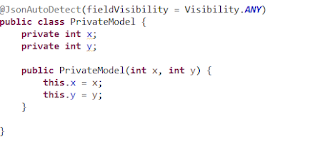
For example, below snippet enables the serialization of private properties.


'JsonAutoDetect.Visibility' is an enumeration for possible visibility thresholds that can be used to limit which methods and fields are auto-detected. Below table summarizes the possible visibility levels.

Visibility constant

Description

ANY

all kinds of access modifiers from private to public are acceptable.

NON_PRIVATE

Value that means that any other access modifier other than 'private' is considered auto-detectable.

PROTECTED_AND_PUBLIC

Value that means access modifiers 'protected' and 'public' are auto-detectable (and 'private' and "package access" == no modifiers are not)

PUBLIC_ONLY

Value to indicate that only 'public' access modifier is considered auto-detectable.

NONE

Value that indicates that no access modifiers are auto-detectable. this can be used to explicitly disable auto-detection for specified types.

DEFAULT

Value that indicates that default visibility level (whatever it is, depends on context) is to be used. This usually means that inherited value (from parent visibility settings) is to be used.

Find the below working application.

PrivateModel.java

package com.sample.app.model;

import com.fasterxml.jackson.annotation.JsonAutoDetect;
import com.fasterxml.jackson.annotation.JsonAutoDetect.Visibility;

@JsonAutoDetect(fieldVisibility = Visibility.ANY)
public class PrivateModel {
	private int x;
	private int y;

	public PrivateModel(int x, int y) {
		this.x = x;
		this.y = y;
	}

}

CustomizeVisibility.java

package com.sample.app.jackson;

import com.fasterxml.jackson.core.JsonProcessingException;
import com.fasterxml.jackson.databind.ObjectMapper;
import com.sample.app.model.PrivateModel;

public class CustomizeVisibility {
	public static void main(String[] args) throws JsonProcessingException {
		
		PrivateModel obj = new PrivateModel(10, 12);
		String result = new ObjectMapper().writeValueAsString(obj);

		System.out.println(result);
	}
}

Output

{"x":10,"y":12}


Previous                                                    Next                                                    Home