Sunday, 5 September 2021

Junit5: Test Suite: @ExcludeClassNamePatterns

@ExcludeClassNamePatterns specifies regular expressions that are used to match against fully qualified class names when running a test suite on the JUnit Platform.
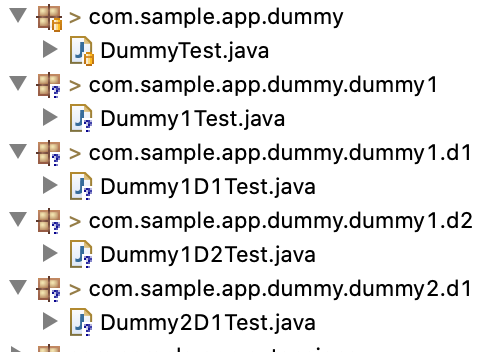


For example, below snippet runs all the test cases in the package "com.sample.app.dummy" and its sub packages.

@RunWith(JUnitPlatform.class)
@SuiteDisplayName("JUnit Platform Suite Demo")
@SelectPackages({"com.sample.app.dummy"})
public class IncludePackagesDemo {

}


What if you want to selectively run the test classes that matches given class name pattern?

You can use @IncludeClassNamePatternsand @ExcludeClassNamePatterns to explicitly include and exclude the classes.


Example


@RunWith(JUnitPlatform.class)
@SuiteDisplayName("JUnit Platform Suite Demo")
@SelectPackages({"com.sample.app.dummy"})
@ExcludeClassNamePatterns({"^.*D1Test$"})
public class ExcludeClassNamePatternsDemo {

}


Above snippet execute below test classes.


a.   DummyTest

b.   Dummy1D2Test

c.    Dummy1Test


Find the below working application.


DummyTest.java


package com.sample.app.dummy;

import static org.junit.jupiter.api.Assertions.assertTrue;

import org.junit.jupiter.api.Test;

public class DummyTest {

    @Test
    public void test1() {
        assertTrue(true);
    }
}


Dummy1Test.java

package com.sample.app.dummy.dummy1;

import static org.junit.Assert.assertTrue;

import org.junit.jupiter.api.Test;

public class Dummy1Test {
    @Test
    public void test1() {
        assertTrue(true);
    }
}


Dummy1D1Test.java

package com.sample.app.dummy.dummy1.d1;

import static org.junit.Assert.assertTrue;

import org.junit.jupiter.api.Test;

public class Dummy1D1Test {

    @Test
    public void test1() {
        assertTrue(true);
    }

}


Dummy1D2Test.java

package com.sample.app.dummy.dummy1.d2;

import static org.junit.Assert.assertTrue;

import org.junit.jupiter.api.Test;

public class Dummy1D2Test {
    @Test
    public void test1() {
        assertTrue(true);
    }
}

Dummy2D1Test.java

package com.sample.app.dummy.dummy2.d1;

import static org.junit.Assert.assertTrue;

import org.junit.jupiter.api.Test;

public class Dummy2D1Test {
    @Test
    public void test1() {
        assertTrue(true);
    }
}


ExcludeClassNamePatternsDemo.java

package com.sample.app.suite;

import org.junit.platform.runner.JUnitPlatform;
import org.junit.platform.suite.api.ExcludeClassNamePatterns;
import org.junit.platform.suite.api.SelectPackages;
import org.junit.platform.suite.api.SuiteDisplayName;
import org.junit.runner.RunWith;

@RunWith(JUnitPlatform.class)
@SuiteDisplayName("JUnit Platform Suite Demo")
@SelectPackages({"com.sample.app.dummy"})
@ExcludeClassNamePatterns({"^.*D1Test$"})
public class ExcludeClassNamePatternsDemo {

}


Run ‘ExcludeClassNamePatternsDemo’ class, you will see the executed test methods result in junit report window.


Note

By default, @SelectPackages will only include test classes whose names either begin with Test or end with Test or Tests.


  Previous                                                    Next                                                    Home

Friday, 3 September 2021

Junit: Test Suite: @IncludeClassNamePatterns

@IncludeClassNamePatterns specifies regular expressions that are used to match against fully qualified class names when running a test suite on the JUnit Platform.


For example, below snippet runs all the test cases in the package "com.sample.app.dummy" and its subpackages.

@RunWith(JUnitPlatform.class)
@SuiteDisplayName("JUnit Platform Suite Demo")
@SelectPackages({"com.sample.app.dummy"})
public class IncludePackagesDemo {

}


What if you want to selectively run the test classes that matches given class name pattern?

You can use @IncludeClassNamePatternsand @ExcludeClassNamePatterns to explicitly include and exclude the classes.


Example
@RunWith(JUnitPlatform.class)
@SuiteDisplayName("JUnit Platform Suite Demo")
@SelectPackages({"com.sample.app.dummy"})
@IncludeClassNamePatterns({"^.*D1Test$"})
public class IncludeClassNamePatternsDemo {

}


Above snippet execute below test classes.


a.   Dummy1D1Test

b.   Dummy2D1Test


Find the below working application.


DummyTest.java


package com.sample.app.dummy;

import static org.junit.jupiter.api.Assertions.assertTrue;

import org.junit.jupiter.api.Test;

public class DummyTest {

    @Test
    public void test1() {
        assertTrue(true);
    }
}


Dummy1Test.java

package com.sample.app.dummy.dummy1;

import static org.junit.Assert.assertTrue;

import org.junit.jupiter.api.Test;

public class Dummy1Test {
    @Test
    public void test1() {
        assertTrue(true);
    }
}


Dummy1D1Test.java

package com.sample.app.dummy.dummy1.d1;

import static org.junit.Assert.assertTrue;

import org.junit.jupiter.api.Test;

public class Dummy1D1Test {

    @Test
    public void test1() {
        assertTrue(true);
    }

}


Dummy1D2Test.java

package com.sample.app.dummy.dummy1.d2;

import static org.junit.Assert.assertTrue;

import org.junit.jupiter.api.Test;

public class Dummy1D2Test {
    @Test
    public void test1() {
        assertTrue(true);
    }
}


Dummy2D1Test.java

package com.sample.app.dummy.dummy2.d1;

import static org.junit.Assert.assertTrue;

import org.junit.jupiter.api.Test;

public class Dummy2D1Test {
    @Test
    public void test1() {
        assertTrue(true);
    }
}


IncludeClassNamePatternsDemo.java

package com.sample.app.suite;

import org.junit.platform.runner.JUnitPlatform;
import org.junit.platform.suite.api.IncludeClassNamePatterns;
import org.junit.platform.suite.api.SelectPackages;
import org.junit.platform.suite.api.SuiteDisplayName;
import org.junit.runner.RunWith;

@RunWith(JUnitPlatform.class)
@SuiteDisplayName("JUnit Platform Suite Demo")
@SelectPackages({"com.sample.app.dummy"})
@IncludeClassNamePatterns({"^.*D1Test$"})
public class IncludeClassNamePatternsDemo {

}


Run ‘IncludeClassNamePatternsDemo’ class, you will see the executed test methods result in junit report window.


Note

By default, @SelectPackages will only include test classes whose names either begin with Test or end with Test or Tests.


Previous                                                    Next                                                    Home

Thursday, 2 September 2021

Neo4j: Skip n items from the query result

‘SKIP n’ is used to skip first n items from the result.


For example, below statement get the person details who is earning second highest salary

MATCH (p:Person) RETURN p.name, p.salary, p.age ORDER BY p.salary DESC SKIP 1 LIMIT 1


Below statement return the third oldest person details

MATCH (p:Person) RETURN p.name, p.salary, p.age ORDER BY p.age DESC SKIP 2 LIMIT 1


Let’s see the same with an example.


Step 1: Open neo4j browser by hitting following url in browser.

http://localhost:7474/browser/


Step 2: Insert data by executing below query.

CREATE (p1:Person{name: "Rama Krishna", age: 32, city: "Bangalore", male: true, designation: "CEO", salary:540000000}),
(p2:Person{name: "Murali", age: 32, city: "Hyderabad", male: true, designation: "Vice President", salary: 43000000}),
(p3:Person{name: "Gopi", age: 34, city: "Chennai", male: true, designation: "Vice President", salary: 63067000}),
(p4:Person{name: "Kiran", age: 28, city: "Bangalore", male: true, designation: "Director", salary: 12000000}),
(p5:Person{name: "Siva", age: 45, city: "Hyderabad", male: true, designation: "Director", salary: 23000000}),
(p6:Person{name: "Kiran", age: 36, city: "Hyderabad", male: true, designation: "Manager", salary: 7800000}),
(p7:Person{name: "Ritweek", age: 23, city: "Bangalore", male: true, designation: "Manager", salary: 8100000}),
(p8:Person{name: "Sudheer", age: 24, city: "Chennai", male: true, designation: "Manager", salary: 7900000}),
(p9:Person{name: "Naveen", age: 37, city: "Bangalore", male: true, designation: "Employee", salary: 4500000}),
(p10:Person{name: "Sailaja", age: 31, city: "Hyderabad", female: true, designation: "Employee", salary: 5300000}),
(p11:Person{name: "Harika", age: 36, city: "Bangalore", female: true, designation: "Employee", salary: 3400000}),
(p12:Person{name: "Brahmam", age: 41, city: "Bangalore", male: true, designation: "Employee", salary: 4560000}),
(office1:Location{name: "Pluto", city: "Bangalore"}),
(office2:Location{name: "Mars", city: "Chennai"})
MERGE (p2)-[:REPORT_TO{from: 2014, description: "reports to"}]->(p1)
MERGE (p3)-[:REPORT_TO{from: 2016, description: "reports to"}]->(p1)
MERGE (p4)-[:REPORT_TO{from: 1997, description: "reports to"}]->(p2)
MERGE (p5)-[:REPORT_TO{from: 1997, description: "reports to"}]->(p3)
MERGE (p6)-[:REPORT_TO{from: 2001, description: "reports to"}]->(p4)
MERGE (p7)-[:REPORT_TO{from: 2009, description: "reports to"}]->(p4)
MERGE (p8)-[:REPORT_TO{from: 1998, description: "reports to"}]->(p5)
MERGE (p9)-[:REPORT_TO{from: 2003, description: "reports to"}]->(p6)
MERGE (p10)-[:REPORT_TO{from: 2004, description: "reports to"}]->(p6)
MERGE (p11)-[:REPORT_TO{from: 2008, description: "reports to"}]->(p7)
MERGE (p12)-[:REPORT_TO{from: 2019, description: "reports to"}]->(p8)
MERGE (p2)-[:FRIEND_TO{from: 2014, description: "friend to"}]->(p1)
MERGE (p10)-[:FRIEND_TO{from: 2014, description: "friend to"}]->(p8)
MERGE (p7)-[:FRIEND_TO{from: 2014, description: "friend to"}]->(p9)
MERGE (p3)-[:RELATIVE_TO{from: 2014, description: "relative to"}]->(p4)
RETURN p1, p2, p3, p4, p5, p6, p7, p8, p9, p10, p11, p12, office1, office2


Get person details who is earning second highest salary

MATCH (p:Person) RETURN p.name, p.salary, p.age ORDER BY p.salary DESC SKIP 1 LIMIT 1


Get third oldest person details

MATCH (p:Person) RETURN p.name, p.salary, p.age ORDER BY p.age DESC SKIP 2 LIMIT 1


Previous                                                    Next                                                    Home