Wednesday, 24 October 2018

JavaScript: debugger statement

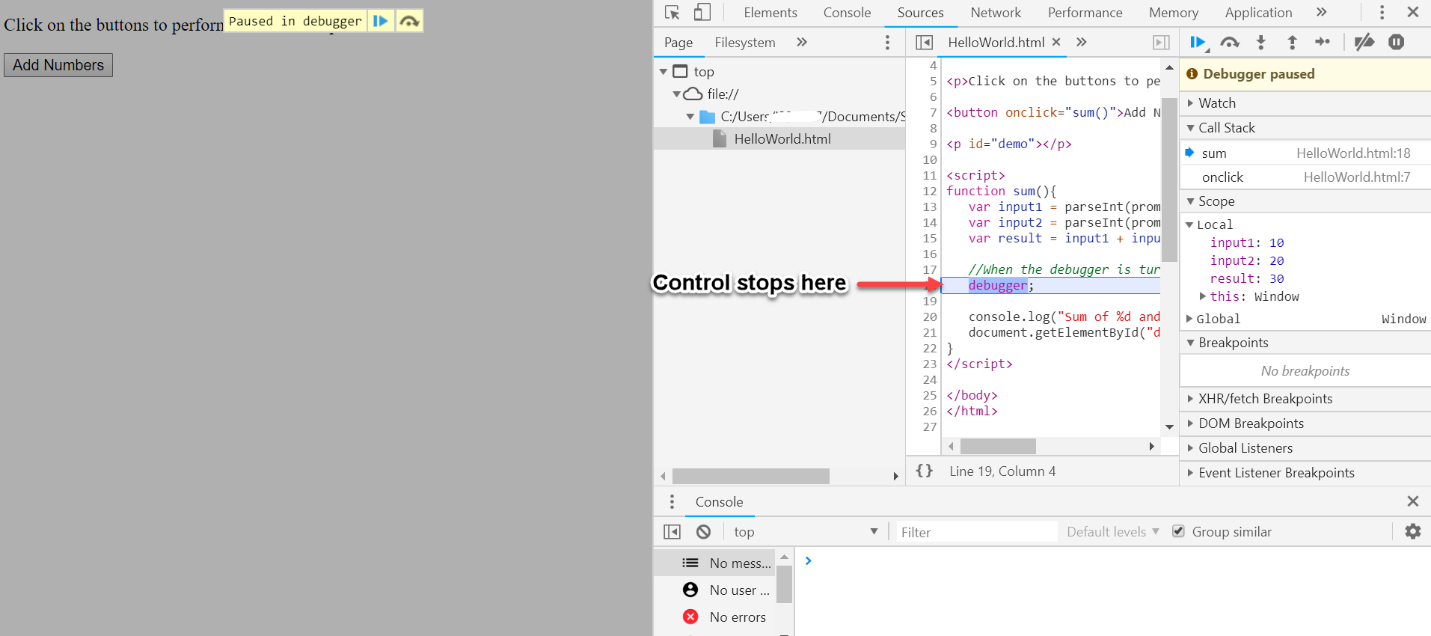
When the debugger is turned on, then debugger statement pauses the execution of JavaScript application.

HelloWorld.html
<!DOCTYPE html>
<html>

<body>

    <p>Click on the buttons to perform Arithmetic Operations</p>

    <button onclick="sum()">Add Numbers</button>

    <p id="demo"></p>

    <script>
        function sum() {
            var input1 = parseInt(prompt("Enter first Argument", 0));
            var input2 = parseInt(prompt("Enter Second Argument", 0));
            var result = input1 + input2;

            //When the debugger is turned on, then the application pauses here
            debugger;

            console.log("Sum of %d and %d is %d", input1, input2, result);
            document.getElementById("demo").textContent = "Result : " + result;
        }
    </script>

</body>

</html>

Load application in browser and turn on the debugger. After entering the inputs to the application, you can observe control stops at debugger statement.


Previous                                                 Next                                                 Home

Tuesday, 23 October 2018

Debug JavaScript Application in Chrome Browser

In this post, I am going to explain how to debug an application in Chrome Browser.

You are going to learn
a.   Key Terms in debugging the application
b.   How to add debug points and inspect the code

Key Terms in debugging the application
Breakpoint: It is the place, where you are informing debugger to stop execution. Once debugger stopped at breakpoint, you can inspect the data, stack traces etc.,

Step Over: When you click on this button, debugger move the control to next line.

Step Into: It is used to step into the function body.

Step out: Used to stepping out of the currently executing function.

How to add debug points and inspect the code?
Let me try to explain with an example.

HelloWorld.html
<!DOCTYPE html>
<html>

<body>

    <p>Click on the buttons to perform Arithmetic Operations</p>

    <button onclick="sum()">Add Numbers</button>

    <p id="demo"></p>

    <script>
        function sum() {
            var input1 = parseInt(prompt("Enter first Argument", 0));
            var input2 = parseInt(prompt("Enter Second Argument", 0));
            var result = input1 + input2;

            console.log("Sum of %d and %d is %d", input1, input2, result);
            document.getElementById("demo").textContent = "Result : " + result;
        }
    </script>

</body>

</html>

Open ‘HelloWorld.html’ in chrome browser.


Right click on the body of html page -> Inspect.

It opens developer tools on right side of the window. Click on Source tab, you can able to see the source code of the application.


Click on the file ‘HelloWorld.html’ under Page tab, it opens the source code.

Click on line numbers in the source code to add debug points.


For example, I added debug points on line 13 and 18.

Click on the button ‘Add Numbers’.

You can see that application stops at debugger point.


Click on ‘Step Over’ button to move to the new line.

After entering the user input, you can see the data at Scope section. This section displays all the local and global variable information. Beside scope section, there is a ‘Call Stack’ window, that gives information about application call stack.

At the bottom of Call Stack section, there is Breakpoints section, it shows all the breakpoints. You can disable the breakpoint by unchecking the checkbox.


Previous                                                 Next                                                 Home

Sunday, 21 October 2018

JavaScript: Map.prototype.values(): Get all the values in Map

Map.prototype.values()
This method return all the values in the map in insertion order.

Example
var values = countriesMap.values();

for(value of values){
  console.log(value);
}

Find the below working application.

HelloWorld.js
var countriesMap = new Map();

countriesMap.set("Bahrain", "Manama");
countriesMap.set("Cameroon", "Yaounde");
countriesMap.set("Norway", "Oslo");
countriesMap.set("India", "New Delhi");

var values = countriesMap.values();

for(value of values){
  console.log(value);
}


Output
Manama
Yaounde
Oslo
New Delhi


Previous                                                 Next                                                 Home

JavaScript: Map.prototype.set(key, value): Set the value for key

Map.prototype.set(key, value)
This method set the value for given key.

Find the below working application.

HelloWorld.js
var countriesMap = new Map();

countriesMap.set("Bahrain", "Manama");
countriesMap.set("Cameroon", "Yaounde");
countriesMap.set("Norway", "Oslo");
countriesMap.set("India", "New Delhi");

console.log("Is countriesMap has Norway : " + countriesMap.has("Norway"));
console.log("Is countriesMap has India : " + countriesMap.has("India"));
console.log("Is countriesMap has Australia : " + countriesMap.has("Australia"));


Output
Is countriesMap has Norway : true
Is countriesMap has India : true
Is countriesMap has Australia : false


Previous                                                 Next                                                 Home

JavaScript: Map.prototype.has(key): Check for existence of key

Map.prototype.has(key)
This method returns true, if the map cotains given key, else false.

Find the below working application.

HelloWorld.js
var countriesMap = new Map();

countriesMap.set("Bahrain", "Manama");
countriesMap.set("Cameroon", "Yaounde");
countriesMap.set("Norway", undefined);
countriesMap.set("India", "New Delhi");

console.log("Is countriesMap has Norway : " + countriesMap.has("Norway"));
console.log("Is countriesMap has India : " + countriesMap.has("India"));
console.log("Is countriesMap has Australia : " + countriesMap.has("Australia"));


Output
Is countriesMap has Norway : true
Is countriesMap has India : true
Is countriesMap has Australia : false


Previous                                                 Next                                                 Home

JavaScript: Map.prototype.keys(): Get all the keys of map

Map.prototype.keys()
This method returns an iterator, that contains all the keys of map.

  var keys = map.keys();
 
  for(var key of keys){
    console.log(key + " : " + map.get(key));
  }

Find the below working application.

HelloWorld.js
function printMap(map){
  console.log("***************************");
  console.log("Total elements in countriesMap are : " + map.size);
  
  var keys = map.keys();
  
  for(var key of keys){
    console.log(key + " : " + map.get(key));
  }
}

var countriesMap = new Map();

countriesMap.set("Bahrain", "Manama");
countriesMap.set("Cameroon", "Yaounde");
countriesMap.set("Norway", "Oslo");
countriesMap.set("India", "New Delhi");
countriesMap.set("Russia", "Moscow");
countriesMap.set("Spain", "Madrid");

printMap(countriesMap);

Output
***************************
Total elements in countriesMap are : 6
Bahrain : Manama
Cameroon : Yaounde
Norway : Oslo
India : New Delhi
Russia : Moscow
Spain : Madrid

Previous                                                 Next                                                 Home

JavaScript: Map.prototype.get(key): Return the value associated with key

Map.prototype.get(key)
This method returns the value associated with this key, or undefined, if there is not key present.

Example
  var keys = map.keys();
 
  for(var key of keys){
    console.log(key + " : " + map.get(key));
  }

Find the below working example.

HelloWorld.js
function printMap(map){
  console.log("***************************");
  console.log("Total elements in countriesMap are : " + map.size);
  
  var keys = map.keys();
  
  for(var key of keys){
    console.log(key + " : " + map.get(key));
  }
}

var countriesMap = new Map();

countriesMap.set("Bahrain", "Manama");
countriesMap.set("Cameroon", "Yaounde");
countriesMap.set("Norway", "Oslo");
countriesMap.set("India", "New Delhi");
countriesMap.set("Russia", "Moscow");
countriesMap.set("Spain", "Madrid");

printMap(countriesMap);


Output

***************************
Total elements in countriesMap are : 6
Bahrain : Manama
Cameroon : Yaounde
Norway : Oslo
India : New Delhi
Russia : Moscow
Spain : Madrid


Previous                                                 Next                                                 Home