Monday, 31 March 2014

ComponentListener


public interface ComponentListener extends EventListener {
    public void componentResized(ComponentEvent e);
    public void componentMoved(ComponentEvent e);
    public void componentShown(ComponentEvent e);
    public void componentHidden(ComponentEvent e);
}

The listener interface for receiving component events. When the component changes its properties like size, location, or visibility changes, the relevant method in the listener object is invoked, and the ComponentEvent is passed to it.

Component events are provided for notification purposes ONLY; The AWT will automatically handle component moves and resizes internally so that GUI layout works properly regardless of whether a program registers a ComponentListener or not.

import java.awt.*;
import java.awt.event.*;

class ComponentListenerInterfEx implements ComponentListener{
 public void componentResized(ComponentEvent e){
  System.out.println("Component resized");
 }
 
 public void componentMoved(ComponentEvent e){
  System.out.println("Component Moved");
 }
 
 public void componentShown(ComponentEvent e){
  System.out.println("Component Shown");
 }
 
 public void componentHidden(ComponentEvent e){
  System.out.println("Component Hidden");
 }
}


import java.awt.event.*;
import javax.swing.*;
import java.awt.*;

class ComponentListenerEx{
 public static void main(String args[]){
  JFrame myFrame = new JFrame("Event Handling Example");
  
  /* Create a button */
  JButton myButton = new JButton("Click Me");
  
  myFrame.setVisible(true);
  myFrame.setSize(250, 250);
  
  /* Add Button to the frame */
  myFrame.add(myButton);
  
  ComponentListenerInterfEx obj1 = new ComponentListenerInterfEx();
  myFrame.addComponentListener(obj1);
 }
}


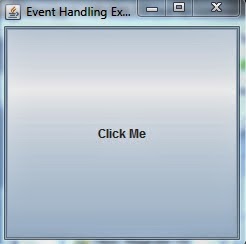
Try to resize, minimize and close the window. You will get below output.


Prevoius                                                 Next                                                 Home

AWTEventListener


AWTEventListeners passively observe events being dispatched in the AWT, system-wide

The class that is interested in monitoring AWT events implements this interface, and the object created with that class is registered with the Toolkit, using the Toolkit's addAWTEventListener method. When an event is dispatched anywhere in the AWT, that object's eventDispatched method is invoked.


import java.awt.*;
import java.awt.event.*;

class AWTEventListenerInterfEx implements AWTEventListener{
 int count = 0;
 
 public void eventDispatched(AWTEvent e){
  System.out.println("Count is " + count++);
 }
}


import java.awt.event.*;
import javax.swing.*;
import java.awt.*;

class AWTEventListenerEx{
 public static void main(String args[]){
  JFrame myFrame = new JFrame("Event Handling Example");
  
  /* Create a button */
  JButton myButton = new JButton("Click Me");
  
  myFrame.setVisible(true);
  myFrame.setSize(250, 250);
  
  /* Add Button to the frame */
  myFrame.add(myButton);
  
  AWTEventListenerInterfEx obj1 = new AWTEventListenerInterfEx();
  
  /* Registers the Listeners */
  Toolkit toolkit = Toolkit.getDefaultToolkit();
      toolkit.addAWTEventListener(obj1, 100);
 }


Prevoius                                                 Next                                                 Home

AdjustmentListener

  
The listener interface for receiving adjustment events.

AdjustmentListener interface extends the EventListener interface. It contains only one method adjustmentValueChanged.

void adjustmentValueChanged(AdjustmentEvent e)
    Invoked when the value of the adjustable has changed.

import java.awt.event.*;
import javax.swing.*;

class AdjustmentListenerEx extends JPanel{
 static JScrollBar bar = new JScrollBar(SwingConstants.HORIZONTAL, 50, 10, 0, 100);
 
 AdjustmentListenerEx(){
  super();
  /* Registers the Listeners */
  bar.addAdjustmentListener(new AdjustmentListener(){
   public void adjustmentValueChanged(AdjustmentEvent  e){
    JOptionPane.showMessageDialog(null, "Some Adjustment performed");
    System.exit(0);
   }
  });
  add(bar);
 }
 
 public static void main(String args[]){
  JFrame myFrame = new JFrame("Event Handling Example");  
  myFrame.setVisible(true);
  myFrame.setSize(250, 250);
  
  /* Add Button to the frame */
  myFrame.add(new AdjustmentListenerEx());  
 }
}


Prevoius                                                 Next                                                 Home

ActionListener


This is interface is used for action events. ActionListener interface extends the EventListener interface. It contains only one method actionPerformed.

void actionPerformed(ActionEvent e)
    Method invoked when an action occurs.


import java.awt.event.*;
import javax.swing.*;

class ActionListenerEx{
 public static void main(String args[]){
  JFrame myFrame = new JFrame("Event Handling Example");
  
  /* Create a button */
  JButton myButton = new JButton("Click Me");
  
  myFrame.setVisible(true);
  myFrame.setSize(250, 250);
  
  /* Add Button to the frame */
  myFrame.add(myButton);
  
  /* Registers the Listeners */
  myButton.addActionListener(new ActionListener(){
   public void actionPerformed(ActionEvent e){
    JOptionPane.showMessageDialog(null, "Some Action performed");
   }
  });
 }
}


When you press the “click me” button below information message will be displayed.


Prevoius                                                 Next                                                 Home

EventListener

it is a tagging interface that all event listener interfaces must extend. A Taggling interface or marker interface is the one without no methods.

Serializable, Clonable are other examples for the Marker Interfaces.

Prevoius                                                 Next                                                 Home

Interfaces

java.awt.event package has below interfaces to support various event handling mechanisms.

Interfaces in java.awt.event package are
ActionListener, AdjustmentListener, AWTEventListener, ComponentListener,
ContainerListener, FocusListener, HierarchyBoundsListener, HierarchyListener,
InputMethodListener, ItemListener, KeyListener, MouseListener, MouseMotionListener, MouseWheelListener,TextListener, WindowFocusListener, WindowListener, WindowStateListener.

Prevoius                                                 Next                                                 Home

Delegation Event Model


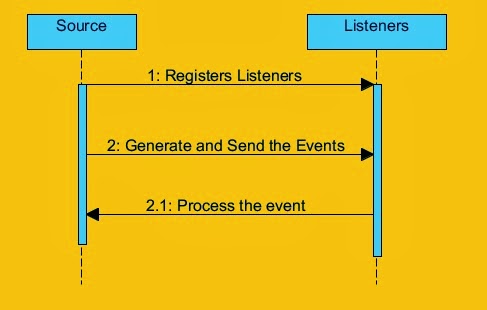
Delegation model concept is Very simple. Listeners Register with the source. Source Generates the event, makes an event object and send it to the listeners. Listeners Process the event object and returns.

Java provides both the ways that a source can add listeners and can remove the listeners also.


import javax.swing.*;
import java.awt.event.*;

public class MouseListenerEx implements MouseListener{
 public void mouseClicked(MouseEvent e) {
        JOptionPane.showMessageDialog(null, "Mouse Clicked");
    }
  
    public void mouseEntered(MouseEvent e) {
        JOptionPane.showMessageDialog(null, "Mouse Entered");
    }
  
  public void mousePressed(MouseEvent e){
  JOptionPane.showMessageDialog(null, "Mouse Pressed");
  }
    
    public void mouseMoved(MouseEvent e){
        JOptionPane.showMessageDialog(null, "Mouse Moved");
    }
  
  public void mouseReleased(MouseEvent e){
  JOptionPane.showMessageDialog(null, "Mouse Moved");
  }
  
 public void mouseExited(MouseEvent e) {
        JOptionPane.showMessageDialog(null, "Mouse Exited");
    }
}


import java.awt.event.*;
import javax.swing.*;

class EventHandlingEx{
 public static void main(String args[]){
  JFrame myFrame = new JFrame("Event Handling Example");
  MouseListenerEx listener1 = new MouseListenerEx();
  
  /* Create a button */
  JButton myButton = new JButton("Click Me");
  
  myFrame.setVisible(true);
  myFrame.setSize(250, 250);
  
  /* Add Button to the frame */
  myFrame.add(myButton);
  
  /* Registers the Listeners */
  myButton.addMouseListener(listener1);
 }
}


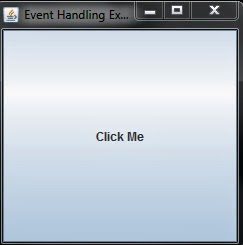
As You Observe the program, Mouse events register with myButton.

Source : myButton
Listener : MouseListener

So Whenever any event occurs, then source generates an event object and send it to the registered listeners.


When Mouse Entered, Below Message dialog appears on the screen.

When Mouse Exited, Below Message dialog appears on the screen.
 When Mouse Pressed, Below Message dialog appears on the screen.

Prevoius                                                 Next                                                 Home